Kroger
Kroger receipt template and example
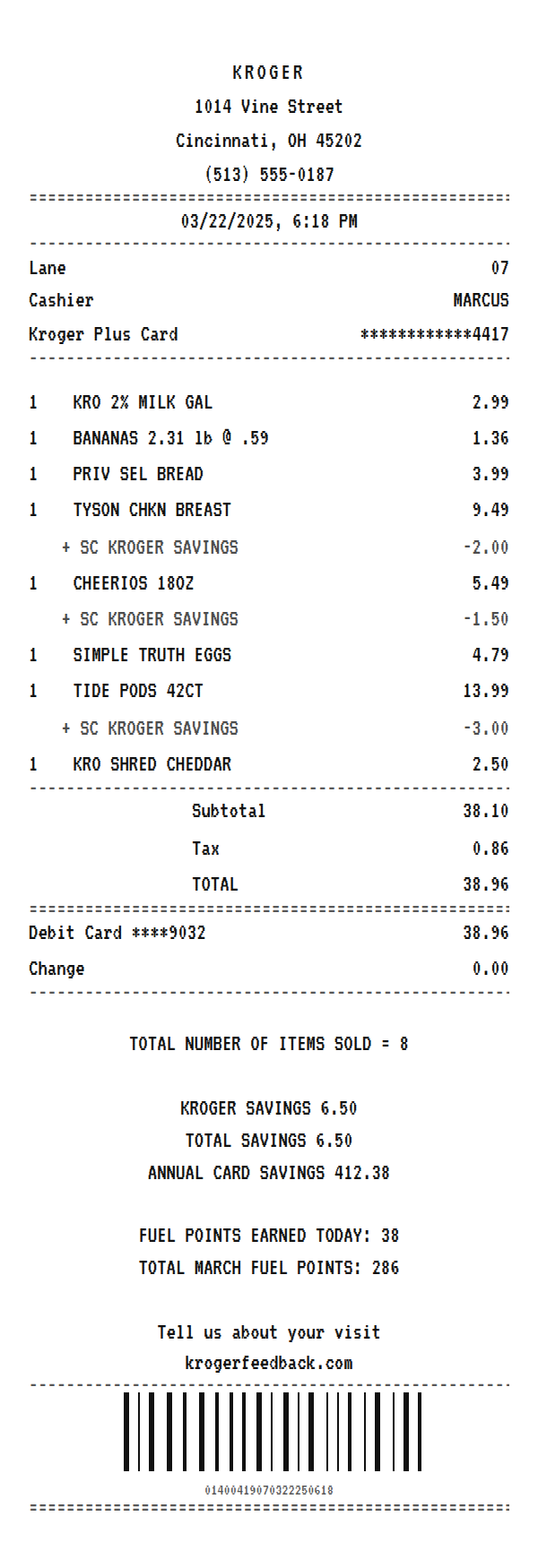
A Kroger receipt lists each item with any card discount printed as an SC Kroger Savings line under it, totals the order, and closes with your savings, annual card savings, and the fuel points you earned. Here is a complete example you can copy and edit in your browser.
Updated
Make your Kroger receipt
Open this template in the editor, change any field, and download it. Free, no signup, no watermark.
Prefer to describe it? Use the AI receipt generator and it writes the Kroger details for you.
- Store type
- Supermarket chain
- Receipt format
- Thermal paper
- Editable fields
- 14 fields
Anatomy
What Is on a Kroger Receipt
A Kroger receipt is built around the loyalty card. When you scan a Kroger Plus Card, each discounted item prints its regular price and then an SC KROGER SAVINGS line with the amount taken off, so the slip shows both what the item costs and what the card saved. Store brand items print short, like KRO for Kroger, PRIV SEL for Private Selection, and SIMPLE TRUTH. After the totals come the item count, the savings for this trip and for the year, the fuel points earned today and for the month, and the krogerfeedback.com survey. The example mirrors a Cincinnati store. Swap in your own store, items, and totals and it becomes a receipt you can print or save.
- Store header
- KROGER centered at the top with the store address and phone. Kroger family stores like Ralphs and Fred Meyer print their own name instead.
- Lane, cashier, and Plus Card
- The checkout lane, the cashier's first name, and the masked Kroger Plus Card number, which is what unlocks the card prices and fuel points.
- Items with SC lines
- Each item at its regular price, with an SC KROGER SAVINGS line underneath for any card discount. Produce prints the weight and the per pound price.
- Totals and tender
- The subtotal after savings, the tax on taxable items only, the total, and the card or cash used with any change.
- Savings and fuel points
- Total items sold, Kroger savings, total savings, annual card savings, fuel points earned today, the month's fuel points total, and the survey link.
Decoder
Kroger receipt codes decoded
| Field | What it means |
|---|---|
| SC | Savings card. An SC KROGER SAVINGS line is the discount you got by scanning your Kroger Plus Card. |
| KRO | Kroger brand. Store brand items are shortened to fit, like KRO 2% MILK. |
| PRIV SEL | Private Selection, Kroger's premium store brand. |
| Kroger Plus Card | The loyalty card used for the trip, masked to the last four digits. |
| Annual Card Savings | How much the card has saved you so far this calendar year. |
| Fuel Points | Points earned on the trip, redeemable for a discount per gallon at Kroger fuel centers. The monthly total prints under today's. |
| Lane | The checkout lane the order was rung up on. |
At a glance
This Kroger Receipt Example, Field by Field
| Paper size | 80mm thermal |
|---|---|
| Text alignment | Centered |
| Currency | USD |
| Sales tax | Applied |
| Tip line | Optional line |
| Barcode or QR | Barcode |
| Line items | 8 |
Compare
How Kroger Receipts Compare to Other Stores
Kroger is the largest traditional supermarket chain in the US. Here is how its receipt compares with other grocers.
| Feature | Kroger | Albertsons | Publix |
|---|---|---|---|
| Loyalty card | Kroger Plus Card | for U rewards | Club Publix |
| Discount lines | SC KROGER SAVINGS under the item | Card savings under the item | Savings printed per item |
| Fuel rewards | Fuel points on every receipt | Gas rewards through for U | None |
| Survey footer | krogerfeedback.com | albertsons.com/survey | Publix survey link |
See also: Albertsons receipt template · Publix receipt template
How to
How to Make a Kroger Receipt
- 1
Open the Kroger Template
Start from this example so the store header, Plus Card line, SC savings lines, and fuel points footer are already laid out.
- 2
Enter Your Items
Type each item at its regular price. For a card discount, add a line under the item named SC KROGER SAVINGS with a negative amount.
- 3
Update the Savings Footer
Edit the savings, annual card savings, and fuel points text so they match the discounts on the slip.
- 4
Download the PNG or PDF
Export a PNG for a budget app or expense report, or print at a true 80mm width on a thermal printer.
Lost receipt
Lost Your Kroger Receipt?
Kroger ties your purchases to your Loyalty ID, so if your Shopper's Card is on your digital account you can review past purchases online. Digital receipts are also available in the Kroger app.
- 1Sign in to your Kroger digital account and open My Purchases to review your order history.
- 2Make sure the Loyalty ID on your account matches the one you use at checkout, or purchases will not show.
- 3View your digital receipt in the Kroger app.
- 4If you still cannot find it, visit the Customer Service desk at your store or use the Kroger help center linked here.
Keeping it for taxes? The IRS suggests holding on to receipts and other records for three years from the date you file, and longer for some. Read the IRS recordkeeping guidance.
Official Kroger help
- Kroger purchase history(opens in a new tab)
Sign in to see past in-store and online purchases.
- Kroger account troubleshooting(opens in a new tab)
Help when purchases or receipts are missing from your account.
- Kroger returns and refunds(opens in a new tab)
Kroger's return policy and how to request a refund.
- Kroger help center(opens in a new tab)
Kroger's main customer help and contact page.
Links go to Kroger's own website. Receipt Canvas is not affiliated with Kroger.
Who uses it
Who Makes a Kroger Receipt
Rebuild a Lost Receipt
Recreate a Kroger grocery receipt for a reimbursement, a shared household budget, or a business expense when the slip is gone.
Budgeting and Expense Apps
Produce realistic grocery receipts with discount lines to test how a budgeting or expense app reads savings.
OCR and App Test Data
SC lines, negative amounts, and weighted produce are hard cases for a receipt parser. This template has all three.
Classroom and Training Material
Show how a loyalty receipt breaks out savings, taxable items, and rewards in a finance or retail training lesson.
A quick note on the rules: making a receipt shaped file for a mockup, a test, a class, or a lost expense you really paid is fine. Passing one off as proof of a purchase that never happened is fraud. Please do not do that.
FAQ
Kroger Receipt Questions
What Does SC Mean on a Kroger Receipt?
SC stands for savings card. Each SC KROGER SAVINGS line is a discount you received because your Kroger Plus Card was scanned. It prints right under the item it applies to.
Where Are Fuel Points on a Kroger Receipt?
Near the bottom, after the savings summary. The receipt shows the fuel points earned today and the running total for the month, which you can redeem at Kroger fuel centers.
Why Is the Tax So Low on a Kroger Receipt?
In many states, groceries are not taxed or are taxed at a reduced rate, so tax applies only to items like detergent or paper goods. That is why the tax line prints without a single rate in this template.
Does This Work for Ralphs, Fred Meyer, or King Soopers?
Those are Kroger family stores and their receipts follow a very similar layout. Change the store name and address in the header and the rest of the template still fits.
Is This an Official Kroger Document?
No. This is an editable template that follows the layout of a grocery receipt. It is for mockups, tests, budgeting, and rebuilding a record of a purchase you actually made, and it is not affiliated with or endorsed by Kroger.
Keep going
Similar Receipts
Albertsons receipt example
Grocery run with itemized produce and pantry lines, sales tax, and for u savings.
See example and templatePublix receipt example
Southeast grocery basket with the store tagline, itemized lines, and a You Saved total.
See example and templateVons receipt example
Supermarket basket with a four field header, itemized lines, and Club Card savings.
See example and template