PetSmart
PetSmart Receipt Template and Example
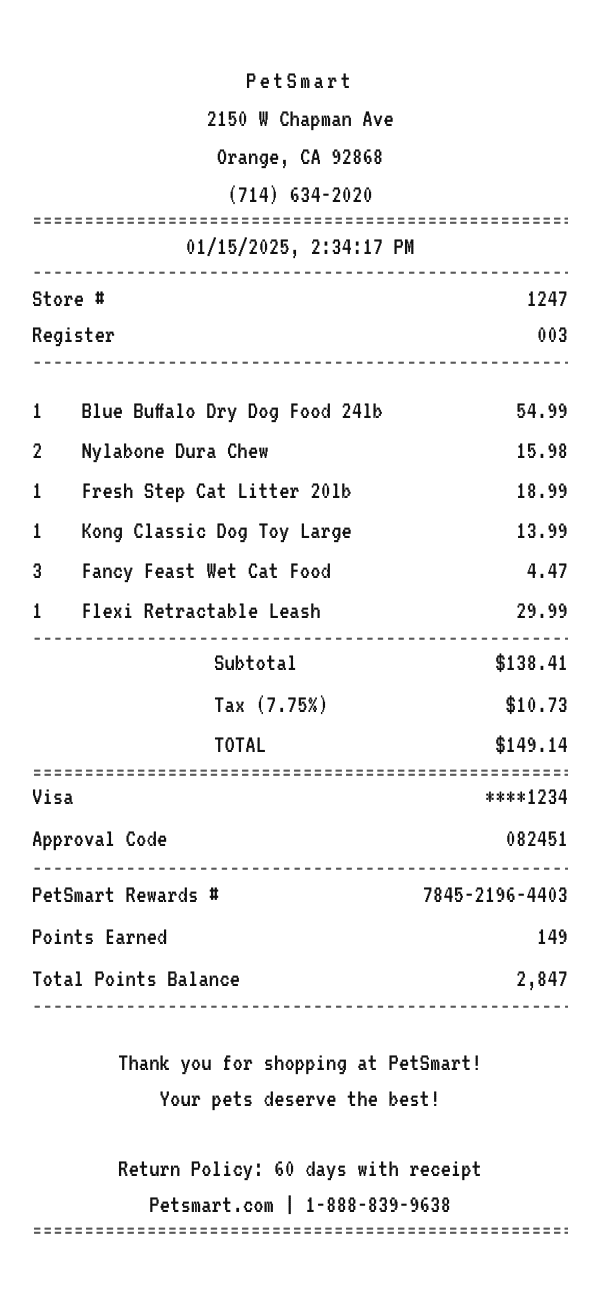
A PetSmart receipt itemizes pet food, toys, and supplies, totals the order with sales tax, records the card, and prints the rewards number with points earned and a balance. Here is a complete example you can copy and edit in your browser.
Make your PetSmart receipt
Open this template in the editor, change any field, and download it. Free, no signup, no watermark.
Prefer to describe it? Use the AI receipt generator and it writes the PetSmart details for you.
- Store type
- Pet supplies store
- Receipt format
- Thermal paper
- Editable fields
- 11 fields
Anatomy
What Is on a PetSmart Receipt
A PetSmart receipt is the record from a pet supply run, where a big bag of dog food, treats, litter, and a toy fill the cart. It identifies the store and register, itemizes each product, sums the subtotal and tax, records the card, and prints the rewards number with the points earned and the running balance. The example below mirrors an Orange, California location. Swap in your own store and items and it becomes a receipt you can print or save.
- Store header
- The PetSmart name centered at the top with the street address and phone below, identifying which store rang the sale.
- Transaction identifiers
- The store number and register, the lines the store uses to look up a purchase for a return.
- Item lines
- Each product on its own line in a quantity, name, price format, from Blue Buffalo dog food and cat litter to a Kong toy and a leash.
- Payment and tax summary
- The subtotal, the sales tax at the local rate, and the total, then the card ending in four digits and an approval code.
- Rewards points and returns
- The PetSmart rewards number with the points earned and the running balance, a thank you, and the 60 day return policy.
Decoder
What the Codes on a PetSmart Receipt Mean
| Field | What it means |
|---|---|
| Store # | The store that rang the sale. |
| Register | The lane that rang the sale, separate from the grooming and services desk. |
| PetSmart Rewards # | The Treats account the purchase is credited to. |
| Points Earned | Points from this purchase, printed under the payment. |
| Total Points Balance | The running balance after the purchase. |
At a glance
This PetSmart Receipt Example, Field by Field
| Paper size | 80mm thermal |
|---|---|
| Text alignment | Centered |
| Currency | USD |
| Sales tax | 7.75% |
| Tip line | Optional line |
| Barcode or QR | None |
| Line items | 6 |
Compare
How PetSmart Receipts Compare to Other Stores
PetSmart is one of the two big pet specialty retailers, competing with a store rival and a large online seller. Here is how its receipt and program compare.
| Feature | PetSmart | Petco | Chewy |
|---|---|---|---|
| Format | Big-box stores with services | Big-box stores with services | Online only |
| Services | Grooming, training, and vet partners | Grooming and vet clinics | Autoship and online pharmacy |
| Loyalty | Treats rewards with points on the receipt | Vital Care membership | Autoship savings |
| Return policy footer | 60 days with receipt | Return window varies | Generous online returns |
| Brands | Blue Buffalo, Kong, and more | WholeHearted and national brands | Wide national brand selection |
See also: Dollar General receipt template · Publix receipt template
How to
How to Make a PetSmart Receipt
- 1
Open the PetSmart Template
Start from this example so the store header, item lines, and rewards points block are already laid out.
- 2
Enter the Store and Items
Swap in the store address and register, then type each pet product with its quantity and price.
- 3
Set the Tax and Points
Enter your local sales tax rate, then edit the points earned and the balance in the footer.
- 4
Download the PNG or PDF
Export at 300 DPI for email, or at a true 80mm width to print on a thermal receipt printer.
Who uses it
Who Makes a PetSmart Receipt
Returns and Proof of Purchase
Rebuild a lost PetSmart receipt so a return within the 60 day window still has its record.
Pet Budgeting and Expenses
Keep a clean record of a pet supply run for a budget or a shared household expense when the printed slip did not survive.
OCR and App Test Data
Generate consistent pet retail line items with a rewards block to test a receipt scanner or an expense parser.
Film, TV, and Photo Props
Dress a scene with a believable pet store receipt that reads correctly on camera, with no watermark to paint out.
A quick note on the rules: making a receipt shaped file for a mockup, a test, a class, or a lost expense you really paid is fine. Passing one off as proof of a purchase that never happened is fraud. Please do not do that.
FAQ
PetSmart Receipt Questions
What Information Is on a PetSmart Receipt?
The store name, address, and phone, the date and time, the store number and register, an itemized list of pet products, the subtotal, sales tax, and total, the card payment with the last four digits and an approval code, and the rewards number with points earned and a balance.
Does the Receipt Show Rewards Points?
Yes. This example prints the PetSmart rewards number with the points earned on the trip and the running balance, the way a real slip surfaces the program. You can edit the numbers or remove them.
Why Does a Pet Store Receipt Include the Bag Size?
Food is priced by bag weight, so the size is part of the item, not a footnote, and a 24lb bag and a 5lb bag are different lines.
Does Grooming or Training Appear on the Same Receipt?
Services are usually rung separately from retail items, so a mixed visit can produce more than one slip. Add a service line in the editor if you need both on one receipt.
Keep going
Similar Receipts
Dollar General receipt example
Discount variety basket with household items, sales tax, and a DG App note.
See example and templatePublix receipt example
Southeast grocery basket with the store tagline, itemized lines, and a You Saved total.
See example and templateSam's Club receipt example
Warehouse club haul with a member number, bulk items, and a savings summary.
See example and template