Home Depot
Home Depot Receipt Template and Example
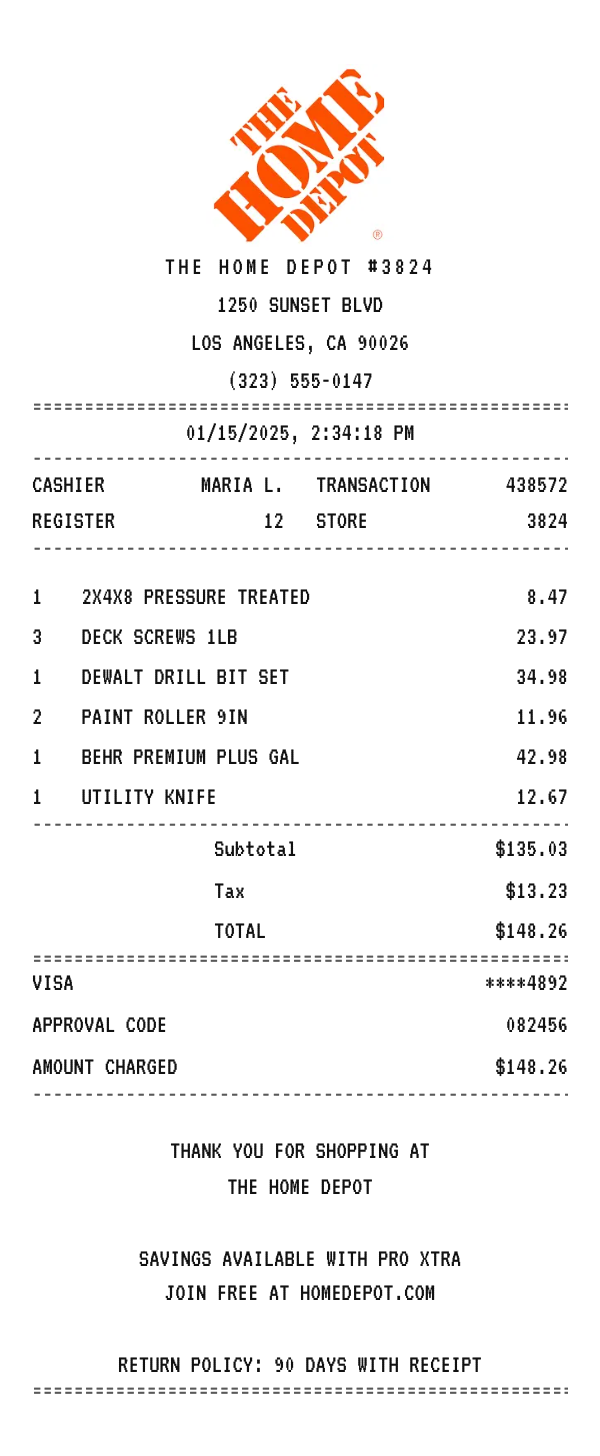
A Home Depot receipt names the store and its number, prints the cashier, register, transaction, and store in a compact grid, itemizes the lumber, tools, and paint, sums the tax and total, and closes with the Pro Xtra prompt and the 90 day return policy. Here is a complete example you can copy and edit in your browser.
Make your Home Depot receipt
Open this template in the editor, change any field, and download it. Free, no signup, no watermark.
Prefer to describe it? Use the AI receipt generator and it writes the Home Depot details for you.
- Store type
- Home improvement warehouse
- Receipt format
- Thermal paper
- Editable fields
- 13 fields
Anatomy
What Is on a Home Depot Receipt
A Home Depot receipt is the slip from the largest home improvement chain, and it is the one people go looking for most often, because a return, a warranty claim, or a job expense usually depends on it. It identifies the store and its number, prints four transaction fields in a two by two grid, lists each item in capitals with a bare price, sums the subtotal, tax, and total, records the card and the amount charged, and ends with the Pro Xtra prompt and the return window. The example below mirrors a Los Angeles store. Swap in your own store, materials, and totals and it becomes a receipt you can print or save.
- Store header
- The Home Depot name with its store number, then the street address, the city and ZIP, and the store phone. The store number repeats further down, which is how a slip survives a faded header.
- Cashier and register grid
- Four fields printed as two rows of two: cashier and transaction on the first, register and store on the second. Returns and price adjustments are looked up from these.
- Item lines
- Each item in capitals with the quantity on the left and a bare price on the right, from 2X4X8 pressure treated lumber and deck screws to a DEWALT bit set and a gallon of BEHR paint. A quantity of three prints the line total, not the unit price.
- Tax and payment
- The subtotal, the sales tax as an amount, and the total, then the card with its last four digits, the approval code, and the amount charged, which matches the total exactly.
- Pro Xtra and returns
- A thank you, the prompt to join Pro Xtra free for contractor pricing and purchase tracking, and the 90 day return policy that the chain prints on every slip.
Decoder
What the Codes on a Home Depot Receipt Mean
| Field | What it means |
|---|---|
| STORE | The store number of the location that rang the sale, repeated lower down so the slip survives a faded header. |
| CASHIER | The associate at the register, or the attendant if you used self checkout. |
| REGISTER | The lane, including self checkout. |
| TRANSACTION | The transaction number for this trip, quoted for returns and price adjustments. |
| APPROVAL CODE | The bank's approval for the charge, printed in caps like the rest of the block. |
| AMOUNT CHARGED | What hit the card, which matches the total exactly. |
At a glance
This Home Depot Receipt Example, Field by Field
| Paper size | 80mm thermal |
|---|---|
| Text alignment | Centered |
| Currency | USD |
| Sales tax | Applied |
| Tip line | Optional line |
| Barcode or QR | None |
| Line items | 6 |
Compare
How Home Depot Receipts Compare to Other Stores
Home Depot is the largest home improvement chain, competing with one national rival and a co-op of local hardware stores. Here is how the receipts and programs compare.
| Feature | The Home Depot | Lowe's | Ace Hardware |
|---|---|---|---|
| Format | Warehouse stores with a lumber yard | Warehouse stores with a lumber yard | Smaller neighborhood stores |
| Loyalty on the receipt | Pro Xtra prompt for contractors | MyLowe's Rewards | Ace Rewards points |
| Own brands | BEHR, HDX, and Husky | Valspar, Kobalt, and Allen + Roth | Craftsman and Ace brand |
| Return policy footer | 90 days with receipt on most items | 90 days with receipt on most items | Varies by store, often 30 to 90 days |
| Receipt lookup | By card or Pro Xtra account | By card or MyLowe's account | By Ace Rewards account |
See also: Walmart receipt template · Mattress Firm receipt template
How to
How to Make a Home Depot Receipt
- 1
Open the Home Depot Template
Start from this example so the store header, the transaction grid, and the return footer are already laid out.
- 2
Enter the Store and Materials
Swap in the store number and address, then type each item with its quantity and price the way it prints in capitals.
- 3
Set the Tax and Total
Enter your local sales tax rate so the subtotal, tax, and total match a real trip, then update the card and approval code.
- 4
Download the PNG or PDF
Export at 300 DPI for email, or at a true 80mm width to print on a thermal receipt printer.
Who uses it
Who Makes a Home Depot Receipt
Returns and Warranty Claims
Rebuild a lost Home Depot receipt so a return inside the 90 day window, or a tool warranty claim, still has its record.
Job Costing and Expense Claims
Contractors bill materials back to a job. Rebuild an itemized materials receipt so a legitimate expense can be filed and reimbursed.
OCR and App Test Data
Generate consistent hardware line items with mixed quantities to test a receipt scanner, an expense parser, or a job costing tool.
Film, TV, and Photo Props
Dress a scene with a believable hardware store receipt that reads correctly on camera, with no watermark to paint out.
A quick note on the rules: making a receipt shaped file for a mockup, a test, a class, or a lost expense you really paid is fine. Passing one off as proof of a purchase that never happened is fraud. Please do not do that.
FAQ
Home Depot Receipt Questions
What Information Is on a Home Depot Receipt?
The store name, number, address, and phone, the date and time, the cashier, register, transaction, and store in a grid, an itemized list of materials, the subtotal, tax, and total, the card with the last four digits and an approval code, and the Pro Xtra prompt with the 90 day return policy.
Can Home Depot Look Up a Receipt I Lost?
Home Depot can often find a purchase from the card used, an order number, or a Pro Xtra account, usually within a limited window. This template is for rebuilding your own record of a purchase, not for replacing that lookup.
Why Does a Quantity of Three Print One Price on a Home Depot Receipt?
The right hand column is the line total, not the unit price, so three boxes of screws at 7.99 print as 23.97. The editor works the same way: set the unit price and the quantity, and the line total follows.
What Is Pro Xtra on a Home Depot Receipt?
It is the contractor loyalty program, free to join, and the footer prompts you to use it for purchase tracking and volume pricing. That is why the prompt sits next to the return policy.
Keep going
Similar Receipts

Walmart receipt example
Supercenter basket with the ST and TR identifier line, tax, a full card block, and a TC number.
See example and templateMattress Firm receipt example
Mattress order with a box spring, delivery fee, sales tax, and a delivery window.
See example and templateCrate & Barrel receipt example
Home goods order with itemized housewares, sales tax, and a 90 day return policy.
See example and template