QuikTrip
QuikTrip Receipt Template and Example
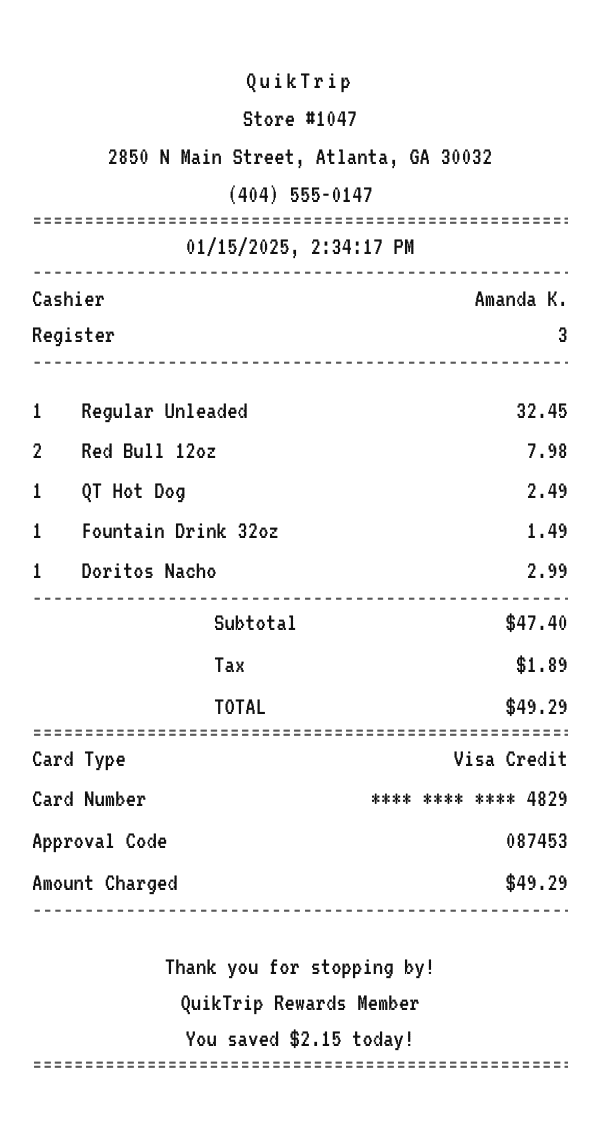
A QuikTrip receipt combines a fuel line with snacks and drinks, totals the trip with tax on the taxable items, records the card, and notes the rewards savings. Here is a complete example you can copy and edit in your browser.
Make your QuikTrip receipt
Open this template in the editor, change any field, and download it. Free, no signup, no watermark.
Prefer to describe it? Use the AI receipt generator and it writes the QuikTrip details for you.
- Store type
- Convenience store and gas
- Receipt format
- Thermal paper
- Editable fields
- 10 fields
Anatomy
What Is on a QuikTrip Receipt
A QuikTrip receipt is the record from a fuel and convenience stop, where a tank of gas rings up alongside a hot dog, a drink, and a snack. It identifies the store, cashier, and register, itemizes the fuel and the store items, sums the subtotal and tax, records the card, and closes with a rewards note. Because fuel is taxed at the pump, the sales tax on the slip applies to the taxable store items, so the tax line shows the amount rather than a rate. The example below mirrors an Atlanta location. Swap in your own store and items and it becomes a receipt you can print or save.
- Store header
- The QuikTrip name and store number centered at the top with the address and phone below, identifying which store rang the sale.
- Transaction identifiers
- The cashier and register, the lines the store uses to look up a trip for a question or a receipt reprint.
- Fuel and store items
- A fuel line for the gas alongside store items like a QT Hot Dog, a fountain drink, and a snack, each in a quantity, name, price format.
- Payment and tax summary
- The subtotal, the tax on the taxable items shown as an amount, and the total, then the card ending in four digits and an approval code.
- Rewards and thank you
- A thank you, a QuikTrip Rewards member line, and the amount you saved on the trip, the way the chain closes a slip.
Decoder
What the Codes on a QuikTrip Receipt Mean
| Field | What it means |
|---|---|
| Cashier | The associate who rang the sale, or the pump if you paid outside. |
| Register | The register inside the store, as opposed to the pump. |
| Card Number | The card, shown only by its last four digits. |
| Approval Code | The approval that came back when the card was authorized. |
| Amount Charged | The final amount taken, which for fuel is settled after pumping. |
At a glance
This QuikTrip Receipt Example, Field by Field
| Paper size | 80mm thermal |
|---|---|
| Text alignment | Centered |
| Currency | USD |
| Sales tax | Applied |
| Tip line | Optional line |
| Barcode or QR | None |
| Line items | 5 |
Compare
How QuikTrip Receipts Compare to Other Stores
QuikTrip is one of the top fuel and convenience chains, competing with the other big food-forward c-stores. Here is how its receipt and program compare.
| Feature | QuikTrip | Sheetz | Wawa |
|---|---|---|---|
| Region | South, Midwest, and beyond | Mid-Atlantic and Appalachia | Mid-Atlantic and Florida |
| Food program | QT Kitchens made to order | Made-to-order menu on touchscreens | Hoagies and made-to-order menu |
| Loyalty | QuikTrip Rewards | MySheetz Rewards with fuel discounts | Wawa Rewards |
| Fuel savings | Rewards savings on the receipt | Cents-per-gallon savings printed | Rewards and fuel deals |
| Tax on the receipt | Amount on taxable store items | Amount on taxable store items | Amount on taxable store items |
See also: Sheetz receipt template · Dollar General receipt template
How to
How to Make a QuikTrip Receipt
- 1
Open the QuikTrip Template
Start from this example so the fuel line, store items, and rewards note are already laid out.
- 2
Enter the Store and Items
Swap in the store address, then type the fuel amount and each snack or drink with its price.
- 3
Set the Tax and Savings
Enter the tax amount for the taxable items, then edit the rewards savings in the footer.
- 4
Download the PNG or PDF
Export at 300 DPI for email, or at a true 80mm width to print on a thermal receipt printer.
Who uses it
Who Makes a QuikTrip Receipt
Mileage and Fuel Logs
Rebuild a lost QuikTrip fuel receipt so a legitimate mileage or travel claim still has its backup.
Expense and Reimbursement
Keep a clean record of a fuel and convenience stop for an expense when the printed slip has faded.
OCR and App Test Data
Generate a mixed fuel and snack receipt to test a scanner or an expense parser against convenience formats.
Film, TV, and Photo Props
Dress a scene with a believable convenience store receipt that reads correctly on camera, with no watermark to paint out.
A quick note on the rules: making a receipt shaped file for a mockup, a test, a class, or a lost expense you really paid is fine. Passing one off as proof of a purchase that never happened is fraud. Please do not do that.
FAQ
QuikTrip Receipt Questions
What Information Is on a QuikTrip Receipt?
The store name and number, the address and phone, the date and time, the cashier and register, a fuel line and store items, the subtotal, tax, and total, the card payment with the last four digits and an approval code, and a rewards savings note.
Why Does the Tax Line Not Show a Percentage?
Fuel is taxed at the pump, so the sales tax on the slip applies only to the taxable store items. The example shows the tax as an amount, the way a convenience receipt does. You can switch to a rate if you prefer.
Why Does a Fuel Receipt Sometimes Authorize More Than the Sale?
Paying at the pump places a hold before the pump runs, then settles to the amount actually pumped, so the hold and the final charge can differ for a day or two.
Can I Show a Pump Number and Gallons?
Yes. Write the fuel line as a per gallon price with the gallons as the quantity, and add the pump as an information line.
Keep going
Similar Receipts
Sheetz receipt example
Made-to-order food and a per-gallon fuel line with a MySheetz savings note.
See example and templateDollar General receipt example
Discount variety basket with household items, sales tax, and a DG App note.
See example and templatePublix receipt example
Southeast grocery basket with the store tagline, itemized lines, and a You Saved total.
See example and template