Lowe's
Lowe's receipt generator and template
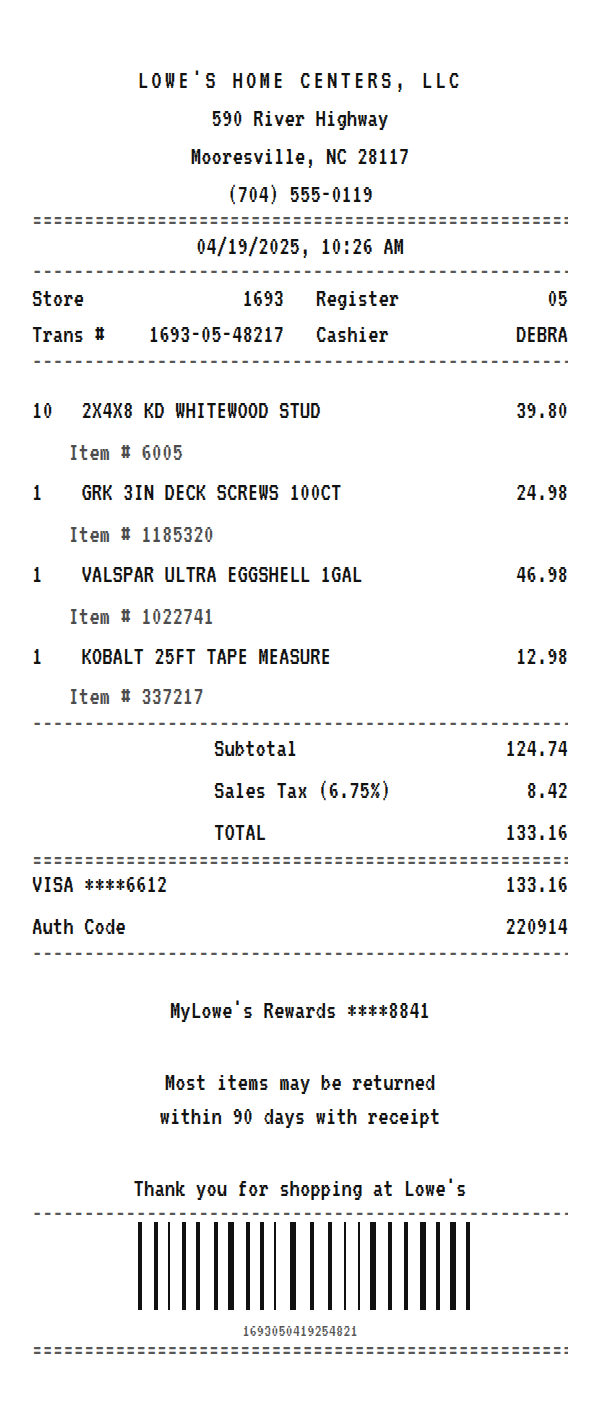
A Lowe's receipt prints the store and transaction number, lists each product with its Lowe's item number underneath, multiplies out lumber by the piece, adds sales tax, and closes with your MyLowe's Rewards number and the return policy. Use the example below as a Lowe's receipt maker: swap in your own materials, then download a printable PDF or PNG.
Updated
Make your Lowe's receipt
Open this template in the editor, change any field, and download it. Free, no signup, no watermark.
Prefer to describe it? Use the AI receipt generator and it writes the Lowe's details for you.
- Store type
- Home improvement store
- Receipt format
- Thermal paper
- Editable fields
- 11 fields
Anatomy
What Is on a Lowe's Receipt
A Lowe's receipt is built to make returns and reorders easy. Every product prints with its Lowe's item number underneath, the same number on the shelf tag and on lowes.com, so you can find the exact stud, screw, or paint again. Lumber rings up as a quantity times a unit price, so ten studs show as one line. The top of the slip carries the legal name, Lowe's Home Centers, LLC, with the store address, then the store number, register, transaction, and cashier. Below the total sit the card, your MyLowe's Rewards number, and the return note. The example mirrors a store in Mooresville, North Carolina, near Lowe's headquarters. Swap in your own store and materials and it becomes a receipt you can print or save.
- Store header
- LOWE'S HOME CENTERS, LLC, the company's legal name, with the store address and phone below it.
- Store and transaction block
- The store number, register, transaction number, and cashier. A return or a receipt lookup uses these.
- Items with item numbers
- Each product with its quantity and price, and the Lowe's item number on a note line underneath.
- Tax and total
- The subtotal, the sales tax at the local rate, and the total, printed as bare numbers.
- Rewards and return note
- The masked MyLowe's Rewards number and a note that most items can be returned within 90 days with the receipt.
Decoder
Lowe's receipt codes decoded
| Field | What it means |
|---|---|
| Item # | Lowe's item number, the same one on the shelf tag and on lowes.com. Use it to reorder the exact product. |
| Store 1693 | The store number, which identifies the Lowe's location that rang the sale. |
| Trans # | Store, register, and sequence number joined into one reference for the transaction. |
| 10 @ 3.98 | Quantity times unit price. Lumber and fasteners ring this way, as one line for the whole count. |
| MyLowe's Rewards | Your loyalty account, masked, which also keeps a purchase history you can look up online. |
At a glance
This Lowe's Receipt Example, Field by Field
| Paper size | 80mm thermal |
|---|---|
| Text alignment | Centered |
| Currency | USD |
| Sales tax | Sales Tax 6.75% |
| Tip line | Optional line |
| Barcode or QR | Barcode |
| Line items | 4 |
Compare
How Lowe's Receipts Compare to Other Stores
Lowe's and Home Depot are the two national home improvement chains. Here is how their receipts compare, with Menards as the regional third.
| Feature | Lowe's | Home Depot | Menards |
|---|---|---|---|
| Item identifier | Lowe's item number under each line | SKU and model number | SKU on each line |
| Loyalty | MyLowe's Rewards | Pro Xtra for pros | 11% rebate on many purchases |
| General return window | 90 days for most items | 90 days for most items | Varies by item |
| Footprint | National | National | Midwest |
See also: Home Depot receipt template · AutoZone receipt template
How to
How to Make a Lowe's Receipt
- 1
Open the Lowe's Template
Start from this example so the store header, transaction block, item number lines, and rewards footer are already laid out.
- 2
Enter Your Materials
Type each product with its quantity and unit price, then put the Lowe's item number on the note line under it.
- 3
Set the Tax
Enter the sales tax rate for the store's county so the tax and total match what you paid.
- 4
Download the PNG or PDF
Export a PDF to attach to a client invoice or expense report, or a PNG for your project records.
Lost receipt
Lost Your Lowe's Receipt?
Lowe's can look up receipts electronically, and a MyLowe's account keeps your online and in-store purchase history in one place. At the store, Lowe's can also try to validate a purchase with your payment card, phone number, or rewards account.
- 1Sign in to your MyLowe's account on Lowes.com or the app and open Purchase History to view and print transaction details.
- 2If an in-store purchase is missing, use Add Existing Receipt in Purchase History to attach it.
- 3At the store, ask for a receipt lookup using your phone number, the card you paid with, or your MyLowe's card.
Keeping it for taxes? The IRS suggests holding on to receipts and other records for three years from the date you file, and longer for some. Read the IRS recordkeeping guidance.
Official Lowe's help
- MyLowe's account(opens in a new tab)
Sign in to see online and in-store purchase history.
- MyLowe's Rewards(opens in a new tab)
Lowe's loyalty program that tracks your purchases.
- Lowe's returns policy(opens in a new tab)
Return rules and the ways Lowe's can validate a purchase.
Links go to Lowe's's own website. Receipt Canvas is not affiliated with Lowe's.
Who uses it
Who Makes a Lowe's Receipt
Contractor and Job Records
Rebuild a receipt for materials you bought for a job, with item numbers, so you can bill the client and reorder the same products.
Home Project Budgets
Track what a renovation actually cost by keeping a clean record of every Lowe's run.
OCR and App Test Data
Quantity times price lines and item numbers under each product make a solid test case for an expense parser.
Rental and Property Expenses
Keep repair and maintenance purchases for a rental property in one place for tax time.
A quick note on the rules: making a receipt shaped file for a mockup, a test, a class, or a lost expense you really paid is fine. Passing one off as proof of a purchase that never happened is fraud. Please do not do that.
FAQ
Lowe's Receipt Questions
What Is the Item Number on a Lowe's Receipt?
It is Lowe's own product number, printed under each item. The same number is on the shelf tag and on lowes.com, so you can search it to find or reorder the exact product.
How Do I Make a Lowe's Receipt for a Contractor Job?
Enter each material with its quantity and unit price, the way lumber rings up as 10 at 3.98, and add the item numbers underneath. Set the county's tax rate and download the PDF to attach to your invoice.
Can Lowe's Look Up a Receipt I Lost?
If you paid by card or used your MyLowe's Rewards account, the store can usually find the purchase, and MyLowe's keeps a purchase history online. This template is for rebuilding a readable record of that purchase for your own files.
How Long Do I Have to Return Something to Lowe's?
Most items can be returned within 90 days with a receipt, and some categories, like major appliances, have shorter windows. The template prints the general note in the footer, so edit it to match your item.
Is This an Official Lowe's Document?
No. This is an editable template that follows the layout of a home improvement store receipt. It is for mockups, tests, props, and rebuilding a record of a purchase you actually made, and it is not affiliated with or endorsed by Lowe's.
Keep going
Similar Receipts
Home Depot receipt example
Hardware run with lumber, tools, and paint, a cashier and register grid, and the 90 day return footer.
See example and templateAutoZone receipt example
Auto parts run with a Duralast battery, a core charge, a warranty line, and AutoZone Rewards.
See example and templateMattress Firm receipt example
Mattress order with a box spring, delivery fee, sales tax, and a delivery window.
See example and template