AutoZone
AutoZone receipt generator and template
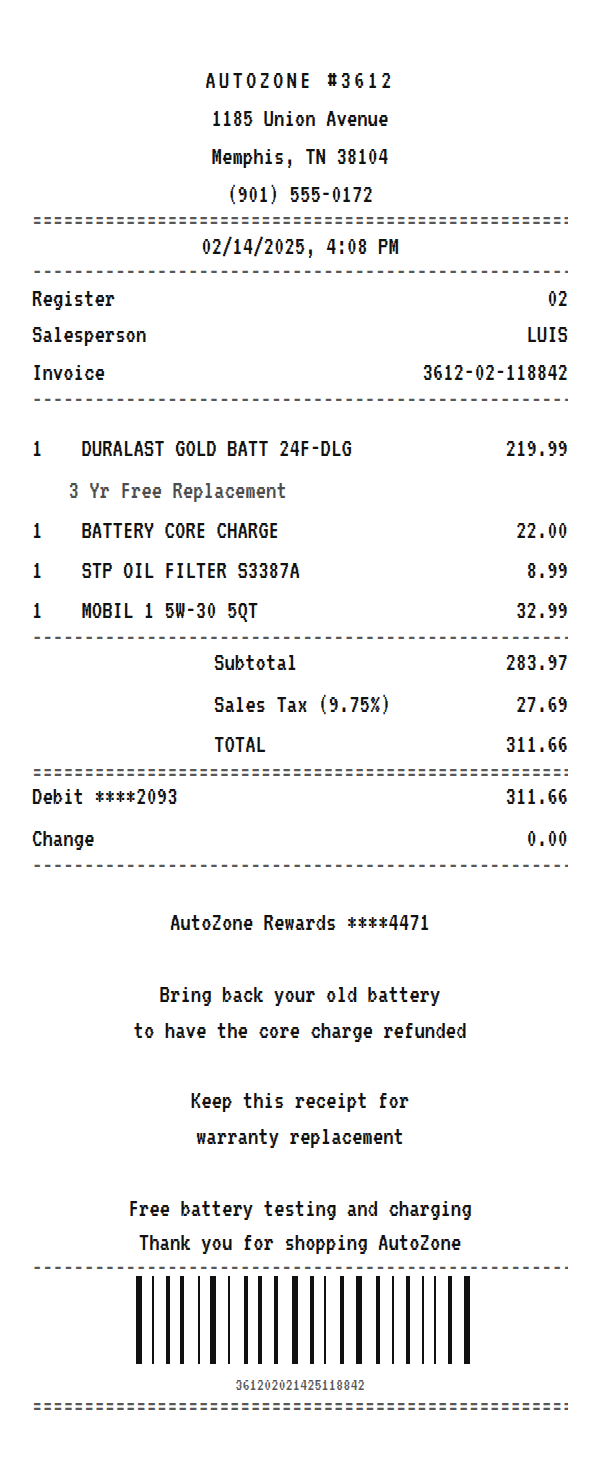
An AutoZone receipt names the store by number, prints an invoice number and the salesperson, lists each part with its warranty under it, rings the battery core charge as its own line, and closes with your AutoZone Rewards number. Use the example below as an AutoZone receipt maker: change the parts and store, then download a printable PDF or PNG.
Updated
Make your AutoZone receipt
Open this template in the editor, change any field, and download it. Free, no signup, no watermark.
Prefer to describe it? Use the AI receipt generator and it writes the AutoZone details for you.
- Store type
- Auto parts store
- Receipt format
- Thermal paper
- Editable fields
- 10 fields
Anatomy
What Is on an AutoZone Receipt
Two things set an AutoZone receipt apart: warranties and core charges. Parts like batteries and alternators come with a replacement warranty, and the receipt is what you bring back to claim it, so the warranty prints under the part. A new battery also carries a core charge, a refundable deposit that comes back when you return the old battery, and it rings up as its own line. The slip is headed with the store number, then the register, salesperson, and invoice number, and closes with the card, your AutoZone Rewards number, and a note about the core refund. The example is a Duralast Gold battery with an oil change kit. Swap in your own parts and store and it becomes a receipt you can print or save.
- Store header
- AUTOZONE with the store number, then the address and phone of that location.
- Invoice and salesperson
- The register, the salesperson who rang the sale, and an invoice number. Warranty claims and returns are looked up with the invoice.
- Parts with warranty lines
- Each part at its price, with the warranty, such as 3 Yr Free Replacement on a Duralast Gold battery, on a note line underneath.
- Core charge
- A separate line for the battery core charge, a deposit refunded when the old battery comes back.
- Rewards and footer
- The masked AutoZone Rewards number, the core refund reminder, a note to keep the receipt for warranty replacement, and the free battery testing offer.
Decoder
AutoZone receipt codes decoded
| Field | What it means |
|---|---|
| AUTOZONE #3612 | The store number, which identifies the location that rang the sale. |
| Invoice | Store, register, and sequence joined into one reference. Warranty claims and returns use it. |
| CORE CHARGE | A refundable deposit on a battery or other rebuildable part, returned when you bring back the old one. |
| 3 Yr Free Replacement | The part's warranty. A Duralast Gold battery is replaced free if it fails within that window. |
| 24F-DLG | The battery's group size and line. 24F is the physical size and terminal layout, DLG is Duralast Gold. |
| AutoZone Rewards | Your loyalty account, masked, which credits qualifying purchases toward a reward. |
At a glance
This AutoZone Receipt Example, Field by Field
| Paper size | 80mm thermal |
|---|---|
| Text alignment | Centered |
| Currency | USD |
| Sales tax | Sales Tax 9.75% |
| Tip line | Optional line |
| Barcode or QR | Barcode |
| Line items | 4 |
Compare
How AutoZone Receipts Compare to Other Stores
AutoZone is the largest auto parts chain in the US. Here is how its receipt compares with its two main rivals.
| Feature | AutoZone | O'Reilly Auto Parts | Advance Auto Parts |
|---|---|---|---|
| House brand | Duralast | BrakeBest, Super Start | Carquest, DieHard |
| Loyalty | AutoZone Rewards | O'Rewards | Speed Perks |
| Core charge line | Yes, on batteries and rebuildables | Yes | Yes |
| Free in-store services | Battery testing and charging | Battery testing | Battery testing |
See also: Lowe's receipt template · Home Depot receipt template
How to
How to Make an AutoZone Receipt
- 1
Open the AutoZone Template
Start from this example so the store header, invoice block, warranty lines, and core charge are already laid out.
- 2
Enter Your Parts
Type each part and price, put its warranty on the note line under it, and keep or remove the core charge line.
- 3
Set the Tax
Enter the sales tax rate for the store's city so the tax and total match what you paid.
- 4
Download the PNG or PDF
Keep a PDF with your vehicle records for warranty claims, or a PNG for a mileage and maintenance log.
Lost receipt
Lost Your AutoZone Receipt?
If you lose an AutoZone receipt, AutoZone Customer Support can find the transaction information for your purchase and explain how to complete a return. AutoZone Rewards members can also review their rewards activity and purchases online.
- 1Contact AutoZone customer support to request the transaction information for your purchase.
- 2If you are an AutoZone Rewards member, sign in to your account and check My Rewards and Purchases.
- 3For online orders, sign in to AutoZone.com to see your order history.
- 4Bring a valid government-issued photo ID if you return an item, since AutoZone may require one.
Keeping it for taxes? The IRS suggests holding on to receipts and other records for three years from the date you file, and longer for some. Read the IRS recordkeeping guidance.
Official AutoZone help
- AutoZone FAQs(opens in a new tab)
Covers returns without a receipt and Customer Support contact.
- AutoZone Rewards(opens in a new tab)
Loyalty program that keeps track of your purchases.
- AutoZone order status(opens in a new tab)
Look up and track online orders.
Links go to AutoZone's own website. Receipt Canvas is not affiliated with AutoZone.
Who uses it
Who Makes an AutoZone Receipt
Warranty Claims
Rebuild the record of a battery or part you bought, with the warranty and invoice number, so a replacement claim has the details it needs.
Vehicle Maintenance Records
Keep every parts purchase in one log for resale value, a lease return, or your own service history.
Fleet and Business Expenses
Recreate parts receipts for a work vehicle and attach the PDF to an expense report or mileage claim.
OCR and App Test Data
A core charge line and warranty notes under items make a realistic test for an expense or fleet app.
A quick note on the rules: making a receipt shaped file for a mockup, a test, a class, or a lost expense you really paid is fine. Passing one off as proof of a purchase that never happened is fraud. Please do not do that.
FAQ
AutoZone Receipt Questions
What Is the Core Charge on an AutoZone Receipt?
It is a refundable deposit on a battery or other rebuildable part. You get it back when you return the old part, so it prints as its own line. If you hand in the old battery at the counter, the charge may not appear at all.
Do I Need the Receipt for an AutoZone Warranty?
The receipt is the easiest proof of the purchase date for a warranty claim, which is why the warranty prints under the part. AutoZone can also find purchases tied to your AutoZone Rewards account or phone number.
How Do I Make an AutoZone Receipt for a Battery?
Enter the battery with its price and put the warranty on the note line under it, then keep the core charge line. The example already has a Duralast Gold battery set up this way.
What Does 24F Mean on a Battery Line?
It is the battery group size, which sets the physical dimensions and terminal layout. It tells you which vehicles the battery fits, so it is worth keeping on the receipt.
Is This an Official AutoZone Document?
No. This is an editable template that follows the layout of an auto parts store receipt. It is for mockups, tests, props, and rebuilding a record of a purchase you actually made, and it is not affiliated with or endorsed by AutoZone.
Keep going
Similar Receipts
Lowe's receipt example
Home improvement run with lumber by the piece, item numbers, sales tax, and MyLowe's Rewards.
See example and template
Home Depot receipt example
Hardware run with lumber, tools, and paint, a cashier and register grid, and the 90 day return footer.
See example and templateQuikTrip receipt example
Convenience trip with a fuel line, snacks, drinks, and a rewards savings note.
See example and template