Best Buy
Best Buy receipt generator and template
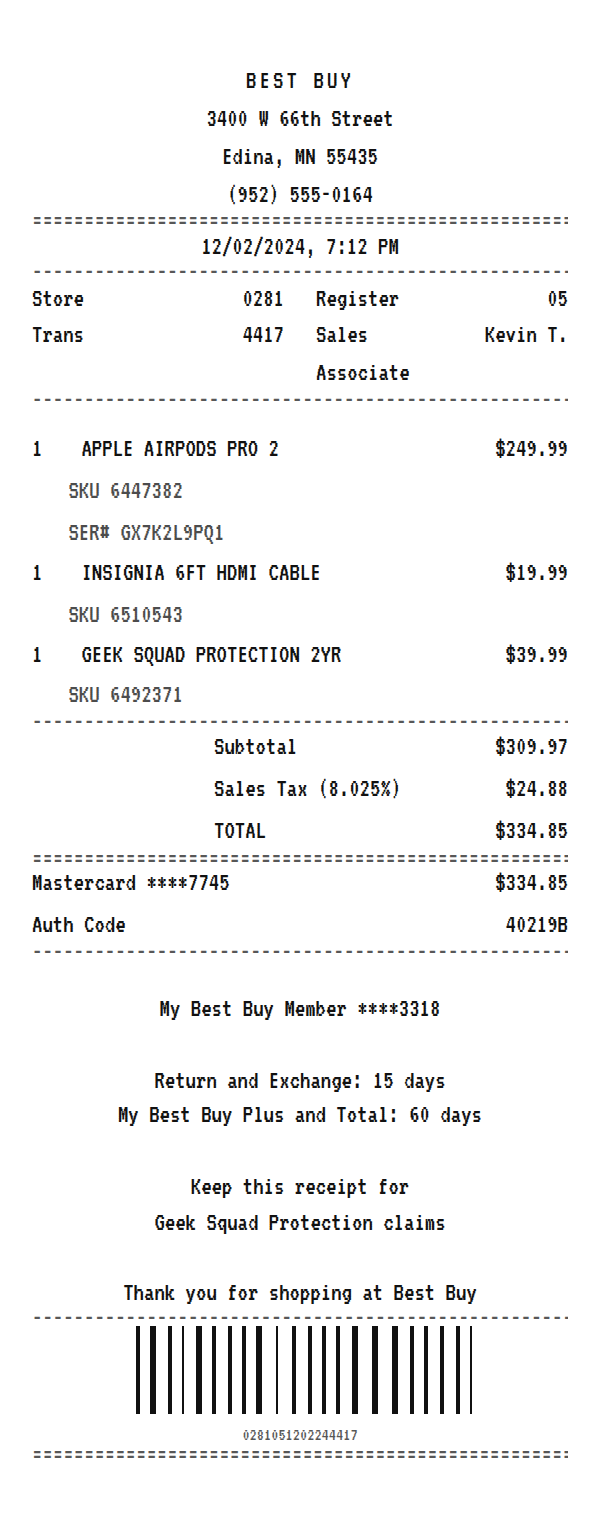
A Best Buy receipt prints a SKU under every item and a serial number under anything serialized, lists Geek Squad Protection as its own line, adds sales tax, and closes with your My Best Buy membership and the return window. Use the example below as a Best Buy receipt maker: change the products, then download a printable PDF or PNG.
Updated
Make your Best Buy receipt
Open this template in the editor, change any field, and download it. Free, no signup, no watermark.
Prefer to describe it? Use the AI receipt generator and it writes the Best Buy details for you.
- Store type
- Consumer electronics retailer
- Receipt format
- Thermal paper
- Editable fields
- 10 fields
Anatomy
What Is on a Best Buy Receipt
Electronics receipts carry more identifiers than most, because returns, warranty claims, and protection plans all have to match a specific unit. A Best Buy receipt prints the store, register, transaction, and associate at the top, then each product with its Best Buy SKU underneath, and a serial number under anything that has one, such as headphones, laptops, or TVs. A Geek Squad Protection plan rings up as its own item with its own SKU. After the tax and total come the card, your My Best Buy member number, and the return window, which depends on your membership tier. The example mirrors a Minnesota store with AirPods Pro, a cable, and a protection plan. Swap in your own store and products and it becomes a receipt you can print or save.
- Store and transaction block
- BEST BUY with the store address and phone, then the store number, register, transaction number, and sales associate.
- SKU under every item
- Each product on its own line at its price, with the Best Buy SKU on a note line underneath. The SKU is what bestbuy.com and the store search by.
- Serial numbers
- Serialized products add a SER# line, which ties the receipt to the exact unit for returns and warranty service.
- Geek Squad Protection
- A protection plan prints as its own item with its own SKU, so the receipt is the proof of coverage.
- Membership and return window
- The masked My Best Buy member number and the return window, which is longer for paid membership tiers.
Decoder
Best Buy receipt codes decoded
| Field | What it means |
|---|---|
| SKU | Best Buy's own product number. Search it on bestbuy.com to find the exact item. |
| SER# | The product's serial number, printed for serialized items like headphones, laptops, and TVs. |
| Store 0281 | The store number, used to look up the transaction for a return or exchange. |
| Trans | The transaction number at that register, which together with the store and date identifies the sale. |
| Geek Squad Protection | A protection plan bought with the product. The receipt line is your proof of coverage. |
| My Best Buy Member | Your membership account, masked. The tier sets your return window. |
At a glance
This Best Buy Receipt Example, Field by Field
| Paper size | 80mm thermal |
|---|---|
| Text alignment | Centered |
| Currency | USD |
| Sales tax | Sales Tax 8.025% |
| Tip line | Optional line |
| Barcode or QR | Barcode |
| Line items | 3 |
Compare
How Best Buy Receipts Compare to Other Stores
Best Buy is the largest electronics specialty retailer in the US. Here is how its receipt compares with the big box stores that also sell electronics.
| Feature | Best Buy | Target | Costco |
|---|---|---|---|
| Item identifier | Best Buy SKU under each item | DPCI item number | Warehouse item number |
| Serial number on the slip | Yes, for serialized items | Not usually | Not usually |
| Protection plans | Geek Squad Protection | Allstate plans | Allstate plans through Costco |
| Membership | My Best Buy tiers | Target Circle | Costco membership required |
See also: Target receipt template · Costco receipt template
How to
How to Make a Best Buy Receipt
- 1
Open the Best Buy Template
Start from this example so the store block, SKU and serial lines, protection plan, and membership footer are already laid out.
- 2
Add Your Products
Type each product and price, then put the SKU and, if it has one, the serial number on the note lines under it.
- 3
Set the Tax
Enter the sales tax rate for the store's city so the tax and total line up with what you paid.
- 4
Download the PNG or PDF
Export a PDF for a warranty claim or an expense report, or a PNG to keep with the product's documents.
Lost receipt
Lost Your Best Buy Receipt?
Best Buy can look up most receipts for you. Online orders can be reprinted from your account, and store staff can find in-store purchases using the card you paid with or your My Best Buy membership details.
- 1For online orders, sign in, find the order, select See details & receipt, then Print receipt.
- 2For in-store purchases, visit the customer service counter and bring the credit card you used, or give your My Best Buy phone number, email, or member ID.
- 3You can also contact Best Buy customer service to request a copy of a store receipt.
- 4Note that Best Buy cannot retrieve cash or check purchases for non-members, or purchases more than ten years old.
Keeping it for taxes? The IRS suggests holding on to receipts and other records for three years from the date you file, and longer for some. Read the IRS recordkeeping guidance.
Official Best Buy help
- Best Buy receipt copies(opens in a new tab)
How to get copies of online and in-store receipts.
- Best Buy return and exchange policy(opens in a new tab)
Return periods and rules by product and membership.
Links go to Best Buy's own website. Receipt Canvas is not affiliated with Best Buy.
Who uses it
Who Makes a Best Buy Receipt
Warranty and Protection Claims
Rebuild the record of an electronics purchase you made, with the SKU and serial number a manufacturer or Geek Squad claim asks for.
Business Equipment Expenses
Recreate a receipt for a laptop, monitor, or accessories bought for work, and attach the PDF to an expense report.
OCR and App Test Data
SKU and serial note lines under items are a good test of whether a receipt scanner can separate identifiers from prices.
Insurance Records
Keep a dated record of expensive electronics with serial numbers for a home insurance inventory.
A quick note on the rules: making a receipt shaped file for a mockup, a test, a class, or a lost expense you really paid is fine. Passing one off as proof of a purchase that never happened is fraud. Please do not do that.
FAQ
Best Buy Receipt Questions
What Is the SKU on a Best Buy Receipt?
It is Best Buy's own product number, printed under each item. Searching the SKU on bestbuy.com brings up the exact product, which is handy when the item name on the receipt is abbreviated.
Does a Best Buy Receipt Show the Serial Number?
For serialized products like headphones, laptops, phones, and TVs, yes. It prints as a SER# line under the item. In this template it is a note line you can edit or remove.
How Do I Make a Best Buy Receipt With Geek Squad Protection?
Add the plan as its own item with its price and SKU, the way the example does. It is taxed like the product, so the totals update on their own.
How Long Is the Best Buy Return Window?
Most products have a 15 day return window, and paid My Best Buy members get longer. The template prints both in the footer, so edit them to match the policy on your purchase date.
Is This an Official Best Buy Document?
No. This is an editable template that follows the layout of an electronics store receipt. It is for mockups, tests, props, and rebuilding a record of a purchase you actually made, and it is not affiliated with or endorsed by Best Buy.
Keep going
Similar Receipts

Target receipt example
Big-box run with Target owned brands, sales tax, and REDcard 5% savings.
See example and template
Walmart receipt example
Supercenter basket with the ST and TR identifier line, tax, a full card block, and a TC number.
See example and template
Costco receipt example
Warehouse club run with item numbers, E and A tax codes, and a tax breakdown.
See example and template