CVS Pharmacy
CVS Pharmacy receipt generator and template
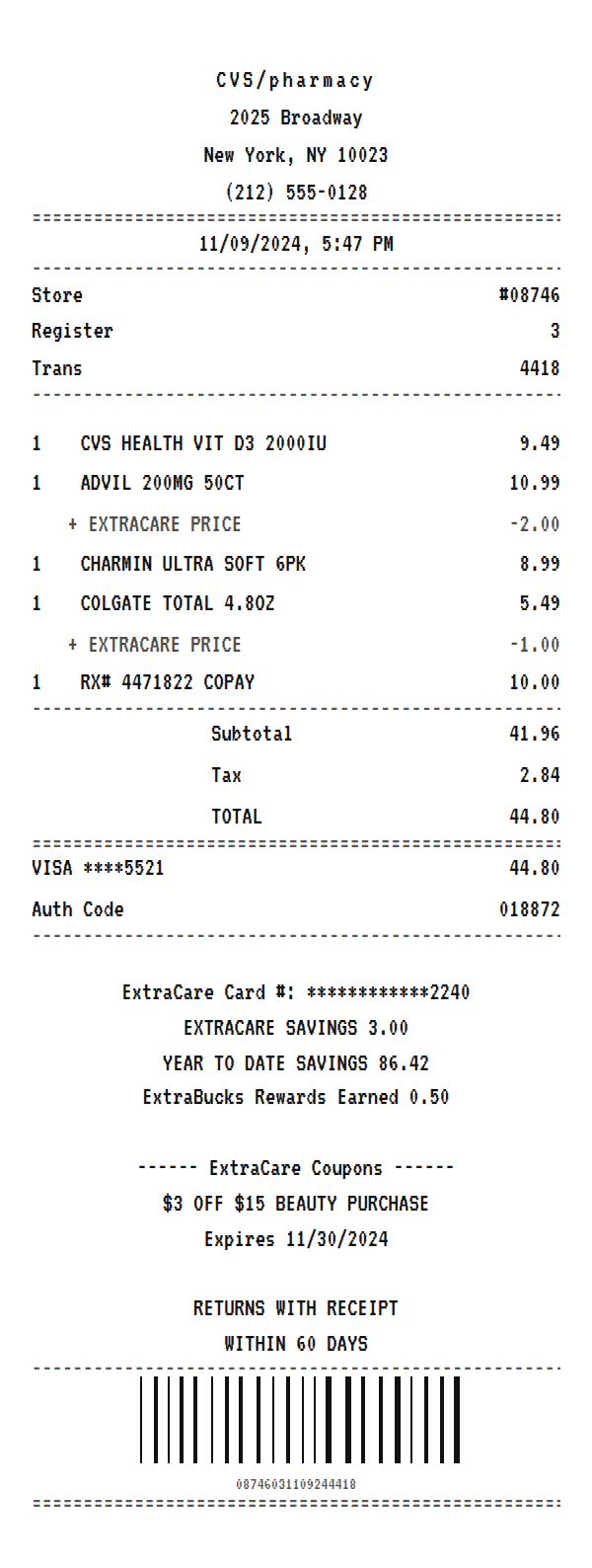
A CVS receipt lists each item with its ExtraCare price under it, rings a prescription copay on its own untaxed line, and closes with your ExtraCare savings, ExtraBucks earned, and the coupon strip CVS receipts are known for. Use the example below as a CVS receipt maker: edit any line, then download a printable PDF or PNG.
Updated
Make your CVS Pharmacy receipt
Open this template in the editor, change any field, and download it. Free, no signup, no watermark.
Prefer to describe it? Use the AI receipt generator and it writes the CVS Pharmacy details for you.
- Store type
- Pharmacy and drugstore chain
- Receipt format
- Thermal paper
- Editable fields
- 11 fields
Anatomy
What Is on a CVS Pharmacy Receipt
Almost everything distinctive about a CVS receipt comes from ExtraCare, the loyalty card. Scan it and each discounted item prints its regular price and then an ExtraCare price line with the amount taken off. Prescriptions ring up as their own line with the RX number and the copay, and they are not taxed, so the tax line covers only the front store items. Below the payment come the ExtraCare card number, the savings on this trip and for the year, any ExtraBucks Rewards earned, and then coupons. Those coupons are why CVS receipts get so long. The example mirrors a Manhattan store with vitamins, pain relief, paper goods, and a copay. Swap in your own store and items and it becomes a receipt you can print or save.
- Store header
- CVS/pharmacy with the store address and phone, followed by the store number, register, and transaction number.
- Items with ExtraCare prices
- Each item at its regular price, with an ExtraCare price line underneath for any card discount. CVS Health is the store brand.
- Prescription line
- The prescription prints with its RX number and the copay you paid. It is not taxed, which is why the tax line is lower than the full subtotal suggests.
- ExtraCare summary
- The masked ExtraCare card number, ExtraCare savings for the trip, year to date savings, and any ExtraBucks Rewards earned.
- Coupon strip and return note
- Personalized ExtraCare coupons with expiry dates, then the return note. This is the part that makes CVS receipts famously long.
Decoder
CVS receipt codes decoded
| Field | What it means |
|---|---|
| #08746 | The CVS store number. Returns and receipt lookups start with it. |
| EXTRACARE PRICE | The discount you got for scanning your ExtraCare card, printed under the item it applies to. |
| RX# | The prescription number. The line shows your copay, not the full price of the drug. |
| ExtraCare Card # | Your loyalty card, masked to the last four digits. |
| ExtraBucks Rewards | Store credit earned on the trip, redeemable on a future purchase. |
| Year to Date Savings | How much ExtraCare has saved you so far this year. |
At a glance
This CVS Pharmacy Receipt Example, Field by Field
| Paper size | 80mm thermal |
|---|---|
| Text alignment | Centered |
| Currency | USD |
| Sales tax | Applied |
| Tip line | Optional line |
| Barcode or QR | Barcode |
| Line items | 5 |
Compare
How CVS Pharmacy Receipts Compare to Other Stores
CVS is one of the two big US drugstore chains. Here is how its receipt compares.
| Feature | CVS Pharmacy | Walgreens | Walmart Pharmacy |
|---|---|---|---|
| Loyalty program | ExtraCare | myWalgreens | None at the pharmacy counter |
| Rewards on the receipt | ExtraBucks Rewards | myWalgreens cash rewards | None |
| Coupons printed on the slip | Yes, often several | Sometimes | No |
| Prescription line | RX number and copay, untaxed | RX number and copay, untaxed | RX number and copay, untaxed |
See also: Dollar General receipt template · Target receipt template
How to
How to Make a CVS Pharmacy Receipt
- 1
Open the CVS Template
Start from this example so the store header, ExtraCare price lines, prescription line, and coupon strip are already laid out.
- 2
Enter Your Items
Type each item at its regular price. For a card discount, add a line under it named EXTRACARE PRICE with a negative amount.
- 3
Set the Tax
Tax applies only to front store items, not prescriptions, so adjust the tax amount to match the taxable items on your slip.
- 4
Download the PNG or PDF
Export a PDF for an FSA or HSA claim or an expense report, or a PNG to keep with your records.
Lost receipt
Lost Your CVS Pharmacy Receipt?
CVS records your purchases through your ExtraCare card. Linking the card to your CVS.com account lets you see your purchase history, and CVS can look up purchase records using your ExtraCare card.
- 1Link your ExtraCare card to your CVS.com account so your purchase history is displayed.
- 2Sign in and check your previous purchases in your account.
- 3If you need help locating a purchase, contact CVS customer service from the ExtraCare contact page linked here.
- 4For a report of FSA-eligible purchases on your ExtraCare card, call 1-800-SHOP-CVS and press 2 for ExtraCare.
Keeping it for taxes? The IRS suggests holding on to receipts and other records for three years from the date you file, and longer for some. Read the IRS recordkeeping guidance.
Official CVS Pharmacy help
- CVS My Account help(opens in a new tab)
Explains how purchase history works with your ExtraCare card and account.
- ExtraCare help(opens in a new tab)
Answers about ExtraCare rewards and purchase records.
- CVS return policy(opens in a new tab)
CVS rules for returns with and without a receipt.
- ExtraCare contact us(opens in a new tab)
How to reach the ExtraCare customer service team.
Links go to CVS Pharmacy's own website. Receipt Canvas is not affiliated with CVS Pharmacy.
Who uses it
Who Makes a CVS Pharmacy Receipt
FSA and HSA Records
Rebuild a lost CVS receipt for a flexible spending or health savings claim, with the prescription copay and eligible items on their own lines.
Medical Expense Tracking
Keep a clean record of pharmacy spending for taxes, reimbursement, or a caregiver's budget.
OCR and App Test Data
Negative discount lines, an untaxed prescription, and a long footer make this a hard test case for a receipt parser.
Film, TV, and Photo Props
Dress a scene with a believable drugstore receipt, long coupon strip included.
A quick note on the rules: making a receipt shaped file for a mockup, a test, a class, or a lost expense you really paid is fine. Passing one off as proof of a purchase that never happened is fraud. Please do not do that.
FAQ
CVS Pharmacy Receipt Questions
Why Are CVS Receipts So Long?
Because ExtraCare coupons print on the receipt itself. After the payment and savings summary, CVS adds personalized coupons with their own expiry dates, and a few of those can double the length of the slip. The template includes one coupon block that you can extend or delete.
How Do I Make a CVS Receipt With a Prescription on It?
Add a line named with the RX number and enter the copay as the price. Prescriptions are not taxed, so lower the tax to cover only the other items. The prescription line in the example shows the format.
What Does EXTRACARE PRICE Mean on a CVS Receipt?
It is the discount you received for scanning your ExtraCare card. The regular price prints on the item line and the ExtraCare price line underneath shows how much came off.
Can I Use This CVS Receipt for an FSA or HSA Claim?
You can use it to rebuild the record of a purchase you actually made, then download it as a PDF to attach to the claim. Your plan administrator may still ask for the pharmacy's own printout or purchase history, which CVS can provide for ExtraCare members.
Is This an Official CVS Document?
No. This is an editable template that follows the layout of a drugstore receipt. It is for mockups, tests, props, and rebuilding a record of a purchase you actually made, and it is not affiliated with or endorsed by CVS Health.
Keep going
Similar Receipts
Dollar General receipt example
Discount variety basket with household items, sales tax, and a DG App note.
See example and template
Target receipt example
Big-box run with Target owned brands, sales tax, and REDcard 5% savings.
See example and templateKroger receipt example
Grocery run with SC Kroger Savings lines, a Plus Card number, and fuel points earned.
See example and template