Amazon
Amazon receipt generator and template
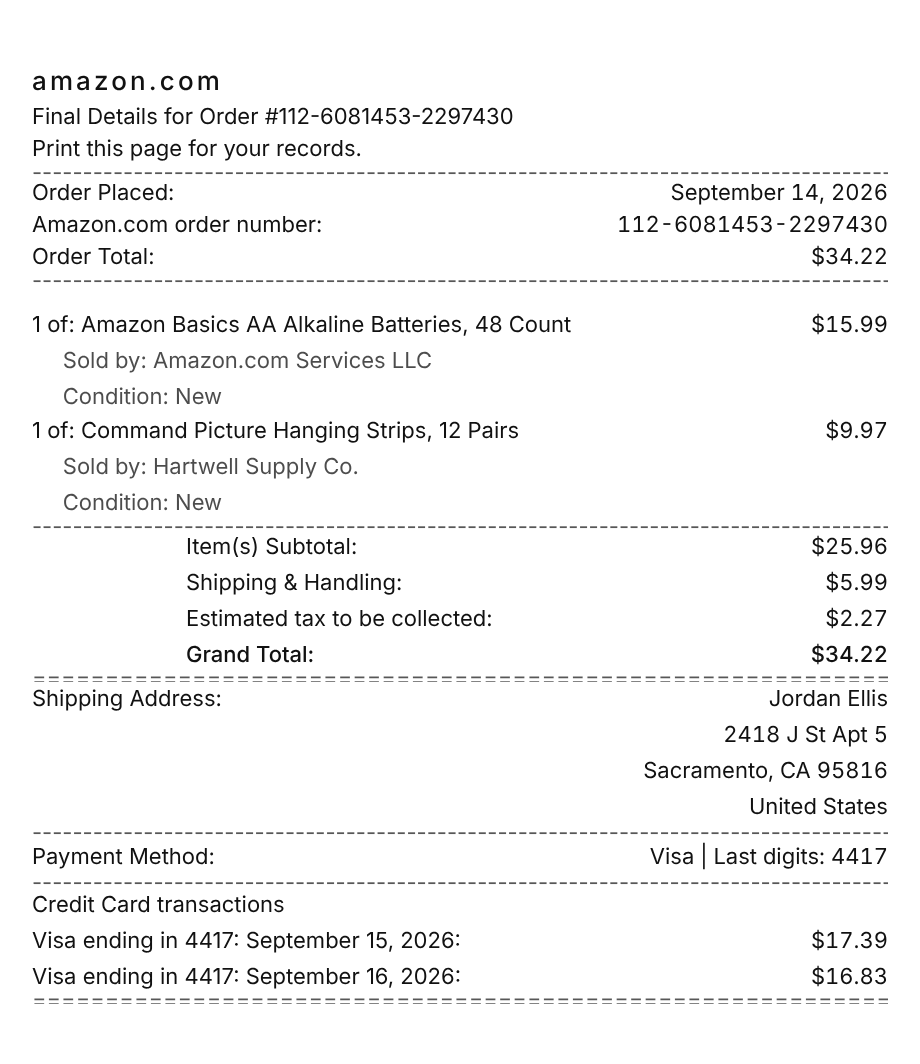
An Amazon receipt is the order invoice you print from Your Orders: the date the order was placed and the 17 digit order number at the top, each item with its Sold by and Condition lines, then the shipping address, the card, Item(s) Subtotal, Shipping & Handling, the estimated tax, and every charge to your card. Use the example below as an Amazon receipt maker: swap in your own items and sellers, then download a printable PDF or PNG.
Updated
Make your Amazon receipt
Open this template in the editor, change any field, and download it. Free, no signup, no watermark.
Prefer to describe it? Use the AI receipt generator and it writes the Amazon details for you.
- Store type
- Online marketplace and retailer
- Receipt format
- A4 page
- Editable fields
- 8 fields
Anatomy
What Is on an Amazon Receipt
Amazon does not hand you a receipt at checkout. The record is the invoice in Your Orders, which becomes available once the order ships and reads like a page rather than a register slip. It opens with Final Details for Order and the order number, then the date the order was placed and the order total. Every item prints as a count, such as 1 of, with the seller of record and the condition underneath, which is how you tell an item Amazon sold from one a third-party seller sold through the same checkout. The shipping address and the payment method follow, then the totals in Amazon's own wording: Item(s) Subtotal, Shipping & Handling, and Estimated tax to be collected. The last section lists each charge to your card, because Amazon charges as each shipment leaves. The example is a two item order where the second item comes from a third-party seller, so it shows two charges that add up to the total.
- Invoice header
- Final Details for Order with the order number, and the line reminding you to print the page for your records.
- Order placed, number, and total
- The date you checked out, the Amazon.com order number in its 3-7-7 digit format, and the order total.
- Items with Sold by and Condition
- Each item as a count, such as 1 of, at its price, with the seller of record and the item's condition on note lines underneath.
- Amazon's totals
- Item(s) Subtotal, Shipping & Handling, and Estimated tax to be collected in Amazon's own labels, then the Grand Total.
- Address, payment, and card charges
- The shipping address, the card by its last digits, and each card charge with the date it posted.
Decoder
Amazon receipt codes decoded
| Field | What it means |
|---|---|
| 112-6081453-2297430 | The Amazon.com order number, 17 digits in a 3-7-7 pattern. Digital orders, such as Kindle books, start with D01 instead. |
| Order Placed | The date you checked out. The card is charged later, as each shipment leaves. |
| Sold by | The seller of record for that item. Amazon.com Services LLC means Amazon sold it; any other name is a third-party seller. |
| Condition | New, or the used grade the seller listed the item under. It matters for a warranty or a resale. |
| Shipping & Handling | The delivery charge on the order. A third-party seller can charge its own shipping even when Amazon's items ship free. |
| Estimated tax to be collected | Sales tax Amazon collects for the delivery address. It is an estimate at checkout and is finalized when the order ships. |
| Visa ending in 4417 | One card charge under Credit Card transactions, with the date it posted. A split shipment shows one charge per box. |
At a glance
This Amazon Receipt Example, Field by Field
| Paper size | A4 page |
|---|---|
| Text alignment | Left aligned |
| Currency | USD |
| Sales tax | Applied |
| Tip line | Optional line |
| Barcode or QR | None |
| Line items | 2 |
Compare
How Amazon Receipts Compare to Other Stores
Amazon, Walmart, and Target all sell online with marketplace sellers mixed into the same checkout, so their order records share a shape. Here is where they differ.
| Feature | Amazon | Walmart | Target |
|---|---|---|---|
| Paid membership | Amazon Prime | Walmart+ | Target Circle 360 |
| Marketplace sellers | Yes, named on each item's Sold by line | Yes, Walmart Marketplace | Yes, Target Plus |
| Where the order record lives | Your Orders, then Invoice | Purchase history in your account | Orders in your Target account |
| Order number | 17 digits in a 3-7-7 pattern | Numeric order number | Numeric order number |
See also: Walmart receipt template · Target receipt template
How to
How to Make an Amazon Receipt
- 1
Open the Amazon Template
Start from this example so the invoice header, the Sold by lines, and Amazon's totals wording are already laid out on a full page.
- 2
Enter the Order and Items
Type the order number and the date it was placed, then each item as 1 of, with the seller and the condition on the note lines under it.
- 3
Set Shipping and Tax
Enter Shipping & Handling and the sales tax rate for the delivery address, then update the card charges so they add up to the total.
- 4
Download the PNG or PDF
Export a full page PDF for an expense report or your files, or a PNG to drop into a document.
Lost receipt
Lost Your Amazon Receipt?
Amazon keeps every order in Your Orders, and once an order ships you can print its invoice or save it as a PDF from there. Amazon Business accounts and purchases at Amazon physical stores have their own routes to the same record.
- 1Go to Your Orders and find the order by searching for it or by filtering to the date range you bought it in. Archived orders turn up the same way.
- 2Select Invoice under the order number, then Print this page for your records, and use your browser's print button. Choose Save as PDF to keep a file.
- 3The invoice appears once the order ships and cannot be edited after that, so details like a VAT number or a different address cannot be added later.
- 4For an Amazon physical store purchase, open Order Details for that order on a computer, select Transactions, and print. This only works if your Amazon account was linked at checkout.
- 5On an Amazon Business account, invoices appear 24 hours after the order ships. Select Invoice in Your Orders, or have an admin or finance user download them in bulk from Your Invoices or Business Analytics.
- 6To match a charge on your card statement to an order, open your transactions in Your Account. Each shipment is charged separately.
Keeping it for taxes? The IRS suggests holding on to receipts and other records for three years from the date you file, and longer for some. Read the IRS recordkeeping guidance.
Official Amazon help
- Print an Amazon invoice(opens in a new tab)
Amazon's steps for printing an invoice from Your Orders once an order ships.
- Identify an Amazon charge(opens in a new tab)
Match a card charge to its order, including split shipments.
- Amazon Business invoices(opens in a new tab)
Where Amazon Business accounts view and bulk download invoices.
Links go to Amazon's own website. Receipt Canvas is not affiliated with Amazon.
Who uses it
Who Makes an Amazon Receipt
Expense Reports for Real Orders
Rebuild a clean invoice for supplies you actually ordered when the original sits in an account you no longer use or cannot reach.
Small Business Bookkeeping
Keep office and shop supplies bought on Amazon in the same itemized format as receipts from other stores, with the seller on every line.
E-commerce and Parser Test Data
Mixed sellers, a split shipment, and Amazon's totals wording make a realistic test for a receipt parser, a budgeting app, or an accounting import.
Film, TV, and Photo Props
Lay a printed order invoice on a desk or in a delivery box for a scene that reads correctly on camera, with no watermark to paint out.
A quick note on the rules: making a receipt shaped file for a mockup, a test, a class, or a lost expense you really paid is fine. Passing one off as proof of a purchase that never happened is fraud. Please do not do that.
FAQ
Amazon Receipt Questions
How Do I Print an Invoice for an Amazon Order?
Go to Your Orders, select Invoice under the order number, then Print this page for your records, and use your browser's print button. To keep a file, choose Save as PDF in the print dialog. The invoice is available once the order has shipped.
What Does Sold By Mean on an Amazon Invoice?
It names the seller of record for that item. Amazon.com Services LLC means Amazon sold it. Any other name is a third-party seller selling through Amazon, and a single order can include both.
Why Does the Invoice Say Estimated Tax to Be Collected?
Tax is estimated at checkout and finalized when the order ships. Amazon notes it can change after checkout, for example when the fulfillment center an item ships from changes in a state that taxes based on where a package ships from.
Why Do I See More Than One Charge for One Amazon Order?
Amazon charges your card when each part of an order ships, so an order that leaves in two boxes shows two charges. Together they add up to the order total, and the invoice lists each one with its date.
Is This an Official Amazon Document?
No. This is an editable template that follows the layout of an online order invoice. It is for mockups, tests, props, and rebuilding a record of a purchase you actually made, and it is not affiliated with or endorsed by Amazon.
Keep going
Similar Receipts

Walmart receipt example
Supercenter basket with the ST and TR identifier line, tax, a full card block, and a TC number.
See example and template
Target receipt example
Big-box run with Target owned brands, sales tax, and REDcard 5% savings.
See example and templateBest Buy receipt example
Electronics order with SKU and serial lines, Geek Squad Protection, and the return window.
See example and template