DoorDash
DoorDash receipt generator and template
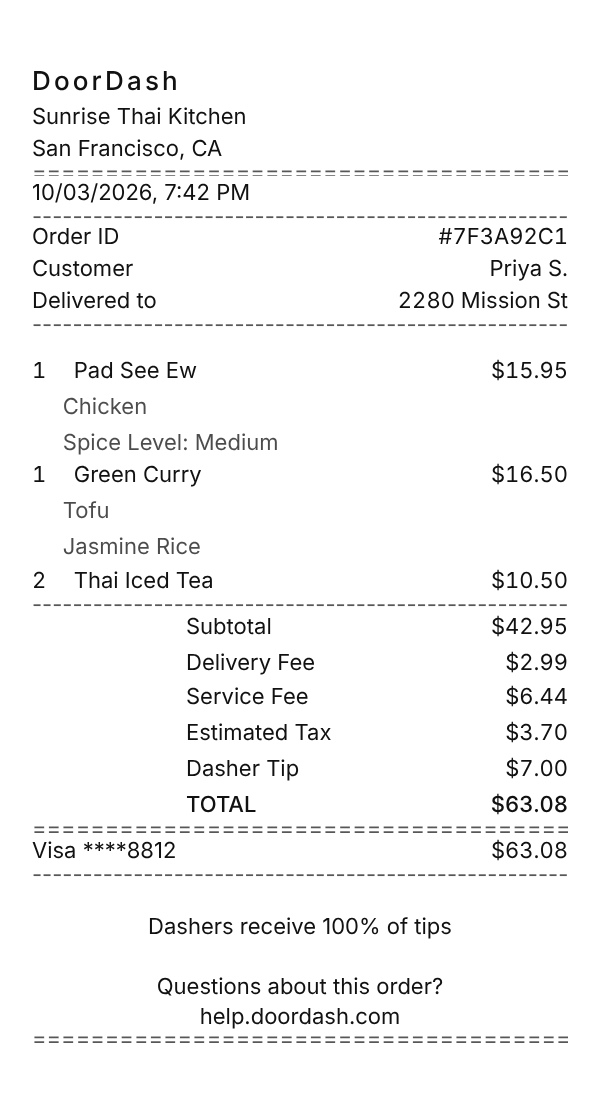
A DoorDash receipt names the restaurant, lists each dish with the options you picked underneath, then breaks out the lines that make a delivery cost more than the menu: the delivery fee, the service fee, the Dasher tip, and the estimated tax, ending with the total and the card you paid with. Use the example below as a DoorDash receipt maker: change the order and fees, then download a printable PDF or PNG.
Updated
Make your DoorDash receipt
Open this template in the editor, change any field, and download it. Free, no signup, no watermark.
Prefer to describe it? Use the AI receipt generator and it writes the DoorDash details for you.
- Store type
- Food delivery app
- Receipt format
- Thermal paper
- Editable fields
- 9 fields
Anatomy
What Is on a DoorDash Receipt
A DoorDash receipt is a record of a delivery, not a restaurant check, so most of it explains the gap between the menu prices and what you paid. The dishes come first, each with its options, like the protein or the spice level, printed under it. Below the subtotal, DoorDash lists its own charges: a delivery fee that varies by store, a service fee that varies with distance and order size, the Dasher tip, and the tax, which is estimated at checkout and finalized on the receipt. Every past order keeps its receipt in your account, in the app and on the website, and the website version can be downloaded. The example is a Thai dinner delivered in San Francisco. Change the restaurant, dishes, and fees and it becomes a receipt you can print or save as a PDF.
- Restaurant and order
- DoorDash, the restaurant the order came from, the date and time, and the order ID.
- Customer and delivery address
- Who placed the order and the address it was delivered to.
- Dishes with options
- Each dish with its quantity and price, and the options you chose in the app on note lines underneath.
- DoorDash fees and tip
- The delivery fee, the service fee, and the Dasher tip, each as its own line below the subtotal.
- Tax, total, and card
- The estimated tax, the total, and the card the order was charged to.
Decoder
DoorDash receipt codes decoded
| Field | What it means |
|---|---|
| Order ID | The reference for the order, shown under Order Details in the app. Support uses it to find the delivery. |
| Delivery Fee | A flat fee per order that varies by store. DashPass members get a $0 delivery fee on eligible orders. |
| Service Fee | DoorDash's fee for handling the order, separate from delivery. It varies with factors like distance and order size. |
| Small Order Fee | Added when the subtotal is under a set minimum. The example order is large enough to skip it. |
| Dasher Tip | The tip for your driver. DoorDash says Dashers receive 100% of customer tips. |
| Estimated Tax | Sales tax based on local rules and the order subtotal. Checkout shows an estimate, and the finalized tax appears on the receipt. |
At a glance
This DoorDash Receipt Example, Field by Field
| Paper size | 80mm thermal |
|---|---|
| Text alignment | Left aligned |
| Currency | USD |
| Sales tax | Applied |
| Tip line | Included |
| Barcode or QR | None |
| Line items | 3 |
Compare
How DoorDash Receipts Compare to Other Stores
DoorDash, Uber Eats, and Grubhub all stack fees and a tip on top of the menu prices, which is why their receipts run longer than a restaurant check. Here is how they compare.
| Feature | DoorDash | Uber Eats | Grubhub |
|---|---|---|---|
| Membership | DashPass | Uber One | Grubhub+ |
| Main member perk | $0 delivery fee on eligible orders | $0 delivery fee on eligible orders | $0 delivery fees on eligible orders |
| Sister brand | Caviar | Uber rides, same account | Seamless |
| Work receipts | Business Profile emails a PDF | Uber for Business profile | Grubhub Corporate accounts |
See also: Uber receipt template · Lyft receipt template
How to
How to Make a DoorDash Receipt
- 1
Open the DoorDash Template
Start from this example so the restaurant header, the dish options, and DoorDash's fee and tip lines are already in place.
- 2
Enter the Restaurant and Dishes
Type the restaurant name, then each dish with its price and the options you chose on the note lines under it.
- 3
Set the Fees, Tip, and Tax
Enter the delivery fee, the service fee, the Dasher tip, and the local tax rate so the total matches your card charge.
- 4
Download the PDF or PNG
Export a PDF to attach to a meal reimbursement, or a PNG to keep with your records.
Lost receipt
Lost Your DoorDash Receipt?
Every DoorDash order keeps an itemized receipt in your account, in the app and on the website, so a lost receipt is easy to get back. The website version has a download button, which is the quickest way to a DoorDash receipt PDF.
- 1On doordash.com, open the menu, select Orders, choose the order, click View Receipt, then Download Receipt.
- 2In the DoorDash app, open the Orders tab, select the order, and tap Receipt in the Order Details section.
- 3Search your inbox for the order confirmation email DoorDash sent when you placed the order.
- 4For work meals, set up a Business Profile with your work email. After each delivery DoorDash emails a Business receipt with the PDF attached, and can pass it to a linked expense tool.
- 5On a DoorDash for Business account, admins can download a monthly receipt summary as a PDF or CSV.
Keeping it for taxes? The IRS suggests holding on to receipts and other records for three years from the date you file, and longer for some. Read the IRS recordkeeping guidance.
Official DoorDash help
- Get your DoorDash receipt(opens in a new tab)
Where to view and download the receipt on the website and in the app.
- DoorDash fees explained(opens in a new tab)
What the delivery fee, service fee, small order fee, and tax lines mean.
- DoorDash Business Profile(opens in a new tab)
Send PDF receipts for work orders to your work email or expense tool.
Links go to DoorDash's own website. Receipt Canvas is not affiliated with DoorDash.
Who uses it
Who Makes a DoorDash Receipt
Work Meal Reimbursement
Rebuild an itemized record of a delivery you paid for on a work trip or a late night at the office, with the fees and tip broken out the way finance teams ask for.
Splitting a Group Order
Show who ordered which dish and how the fees and tip were shared when roommates or coworkers split one delivery.
Delivery App and OCR Test Data
Three fee lines, dish options, and a tip make a realistic test case for an expense parser, a split payment app, or a budgeting tool.
Restaurant and UX Mockups
Drop a realistic delivery receipt into a pitch deck, a product mockup, or a training guide for restaurant staff.
A quick note on the rules: making a receipt shaped file for a mockup, a test, a class, or a lost expense you really paid is fine. Passing one off as proof of a purchase that never happened is fraud. Please do not do that.
FAQ
DoorDash Receipt Questions
How Do I Download a DoorDash Receipt as a PDF?
On doordash.com, open Orders from the menu, select the order, click View Receipt, then Download Receipt. In the app, open the Orders tab, select the order, and tap Receipt under Order Details. If you only have the app view, open the same order on the website, or print the receipt page and choose Save as PDF.
What Is the Service Fee on a DoorDash Receipt?
It is DoorDash's own fee for facilitating the order, separate from the delivery fee, and it varies with factors like distance and order size. In markets still on the older fee structure, it is 15% of the subtotal for most orders and 5% for most eligible DashPass restaurant orders.
Does the Dasher Get the Whole Tip?
Yes. DoorDash says Dashers receive 100% of customer tips. Depending on your location you can tip at checkout or after delivery, and the tip prints as its own Dasher Tip line.
Can DoorDash Send My Receipts to a Work Email?
Yes, through a Business Profile. Add your work email to the profile, and after each delivery placed with it DoorDash emails a message with Business receipt in the subject and the receipt attached as a PDF. It can also send receipts to a linked expense tool such as SAP Concur or Expensify.
Is This an Official DoorDash Document?
No. This is an editable template that follows the layout of a food delivery order receipt. It is for mockups, tests, props, and rebuilding a record of a purchase you actually made, and it is not affiliated with or endorsed by DoorDash.
Keep going
Similar Receipts
Uber receipt example
UberX airport run with the trip fare, Booking Fee, tolls and surcharges, New Jersey sales tax, and a tip.
See example and templateLyft receipt example
Standard ride across New York City with the Lyft fare, Black Car Fund, sales tax, tip, and ride ID.
See example and templateAmazon receipt example
Amazon order invoice with Sold by and condition lines, shipping, estimated tax, and split card charges.
See example and template