Uber
Uber receipt generator and template
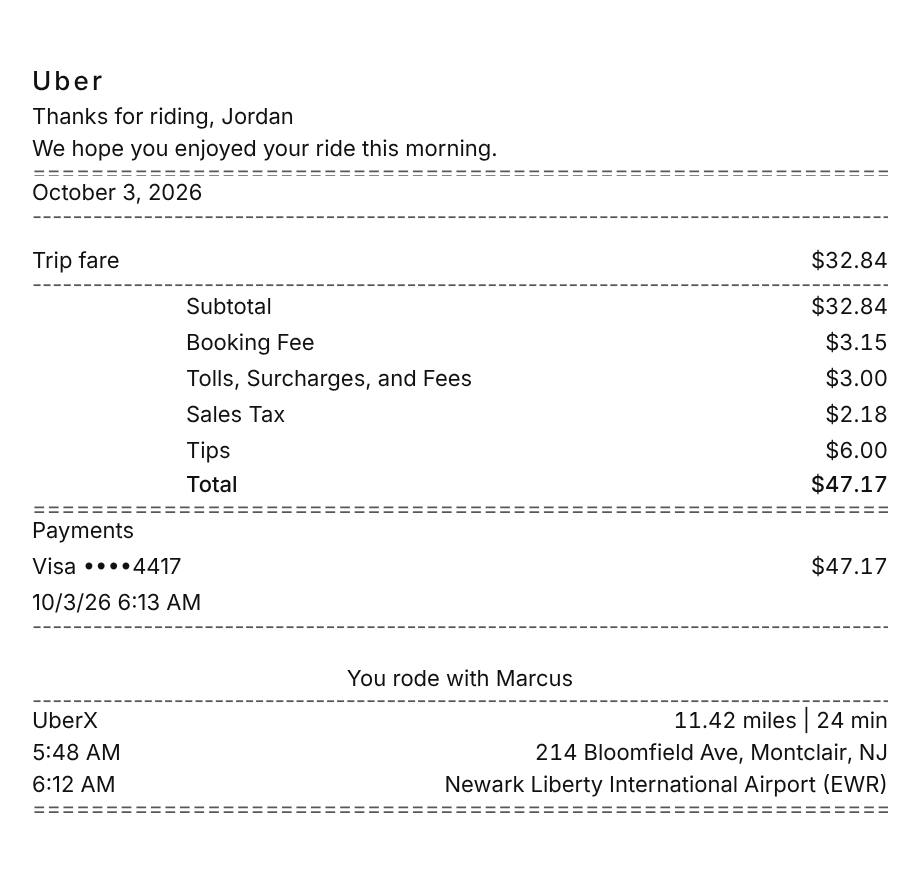
An Uber receipt thanks you by name, breaks the price into the trip fare, the Booking Fee, and any tolls, surcharges, and taxes, adds your tip, shows the card that paid, and ends with the driver, the vehicle type, the miles and minutes, and the pickup and drop-off. Use the example below as an Uber receipt maker: change the trip, then download a PDF or PNG.
Updated
Make your Uber receipt
Open this template in the editor, change any field, and download it. Free, no signup, no watermark.
Prefer to describe it? Use the AI receipt generator and it writes the Uber details for you.
- Store type
- Rideshare app
- Receipt format
- A4 page
- Editable fields
- 7 fields
Anatomy
What Is on an Uber Receipt
Uber does not hand you a paper slip. It emails a receipt to the address on your account when the trip ends and keeps a copy under Activity in the app, so the layout follows that email. It opens with the date and a thank-you line. The price breakdown comes next: the trip fare and subtotal, the Booking Fee, and a single Tolls, Surcharges, and Fees line that rolls up airport charges, tolls, and government fees, then sales tax where the state taxes rides, and your tip. Under the card that paid sit the driver's first name and the trip itself: the product, such as UberX, the distance and time, and the pickup and drop-off with their clock times. The example is an early UberX ride from Montclair to Newark Liberty Airport, so it carries New Jersey's sales tax and state surcharge. Swap in your own trip and it becomes a receipt you can print or save.
- Greeting and date
- Thanks for riding with your first name, a line about the time of day, and the date of the trip.
- Fare breakdown
- The trip fare and subtotal, then the Booking Fee and one Tolls, Surcharges, and Fees line for airport charges, tolls, and government fees.
- Tax and tip
- Sales tax where the state taxes rides, as New Jersey and New York do, and the tip you added in the app.
- Payment
- The card that paid, masked to the last four digits, with the amount and the time it was charged.
- Driver and trip details
- The driver's first name, the product such as UberX, the distance and duration, and the pickup and drop-off times and addresses.
Decoder
Uber receipt codes decoded
| Field | What it means |
|---|---|
| Trip fare | The price of the ride itself from your upfront price, before the Booking Fee, tolls, surcharges, and tax. |
| Booking Fee | A variable fee Uber says supports regulatory, safety, and operating costs such as commercial auto insurance. It depends on the city and distance, and not every state has one. |
| Tolls, Surcharges, and Fees | One line for tolls on the route, airport and venue surcharges, and government fees, such as New Jersey's $0.50 state surcharge. This money goes to third parties. |
| Sales Tax | State sales tax on the ride, itemized only where rides are taxed, such as New Jersey and New York. Uber sends it to the state. |
| UberX | The product you booked. Comfort, UberXL, or Uber Black prints here instead when you ride one of those. |
| 11.42 miles | 24 min | The distance and duration of the trip, printed next to the product. |
| Visa ••••4417 | The card that paid, masked to the last four digits. A temporary hold placed when you requested the ride is separate from this charge. |
At a glance
This Uber Receipt Example, Field by Field
| Paper size | A4 page |
|---|---|
| Text alignment | Left aligned |
| Currency | USD |
| Sales tax | Applied |
| Tip line | Included |
| Barcode or QR | None |
| Line items | 1 |
Compare
How Uber Receipts Compare to Other Stores
Uber and Lyft both price rides upfront, but their receipts label the charges differently. Here is how they compare with a metered taxi.
| Feature | Uber | Lyft | Metered taxi |
|---|---|---|---|
| Fare line | Trip fare | Lyft fare with miles and time | Metered fare |
| Platform fee | Booking Fee, in most states | Service fee, inside upfront fares | None |
| Where receipts live | Activity in the app and riders.uber.com | Ride history in the app | From the driver or the in-cab screen |
| Membership | Uber One | Lyft Pink | None |
See also: Lyft receipt template · DoorDash receipt template
How to
How to Make an Uber Receipt
- 1
Open the Uber Template
Start from this example so the greeting, fare breakdown, payment block, and trip details are already laid out like the trip email.
- 2
Enter the Fare Lines
Type the trip fare, then set the Booking Fee and the Tolls, Surcharges, and Fees amounts from your trip, or delete the ones that did not apply.
- 3
Set the Tax and Tip
Keep the sales tax for a New Jersey or New York ride, or set the rate to zero for a state that does not tax rides, then enter your tip.
- 4
Add the Trip and Download
Fill in the product, the miles and minutes, and the pickup and drop-off, then download a PDF or PNG.
Lost receipt
Lost Your Uber Receipt?
Uber emails a receipt to the address on your account when each trip ends, and every trip stays in your account, so you can pull up, resend, or download any receipt yourself.
- 1In the Uber app, open Activity, select the completed trip, and tap Receipt to see the full price breakdown.
- 2Scroll to the bottom of the receipt and choose Download PDF for a file, or Resend email to send it to the address on your account.
- 3On a computer, sign in at riders.uber.com, open My Trips, select the trip, and choose View Receipt or Resend Receipt.
- 4If the ride was billed to a company account, an Uber for Business admin can open the Activity tab at business.uber.com, expand the trip, and download the receipt under Transactions.
- 5If receipts never arrive, check your spam and junk folders and confirm the email address under Account, then Settings.
Keeping it for taxes? The IRS suggests holding on to receipts and other records for three years from the date you file, and longer for some. Read the IRS recordkeeping guidance.
Official Uber help
- How to get a trip receipt(opens in a new tab)
Uber's steps to view, resend, or download a receipt in the app and on the web.
- Booking Fee(opens in a new tab)
What the Booking Fee covers and how it is set.
- Uber for Business trip receipts(opens in a new tab)
Where admins download receipts for rides on a company account.
Links go to Uber's own website. Receipt Canvas is not affiliated with Uber.
Who uses it
Who Makes an Uber Receipt
Business Travel Expense Reports
Rebuild a clean record of a ride you took for work, with the fare split from the tip, when the original email is buried or went to an old address.
Airport Trip Records
Keep airport surcharges and tolls itemized on a trip report, so a reviewer can see why the fare was higher than a ride across town.
Expense App and OCR Testing
A digital receipt with fee lines, a tip, and two addresses is a realistic test case for receipt scanning and expense software.
Film and App Mockups
Use a believable rideshare receipt as a prop on screen or as placeholder content in a travel app design.
A quick note on the rules: making a receipt shaped file for a mockup, a test, a class, or a lost expense you really paid is fine. Passing one off as proof of a purchase that never happened is fraud. Please do not do that.
FAQ
Uber Receipt Questions
What Is the Booking Fee on an Uber Receipt?
It is a variable fee that Uber says helps cover regulatory, safety, and operating costs, such as the commercial auto insurance it carries for drivers. It depends on the city and trip distance, it is already inside the upfront price you see, and not every state has one.
What Does Tolls, Surcharges, and Fees Mean on an Uber Receipt?
It groups the charges that go to third parties: tolls on the route and for the driver's return, surcharges at airports, seaports, stadiums, and other venues, and government fees. A trip that starts and ends in New Jersey, for example, carries a $0.50 state surcharge that goes to the State of New Jersey.
How Do I Download an Uber Receipt as a PDF?
In the app, open Activity, choose the trip, tap Receipt, and scroll down to Download PDF. On a computer, open the trip at riders.uber.com and choose View Receipt, where you can print, resend, or download it.
Why Is My Uber Receipt Different From the Upfront Price?
The price can change if you add a stop or change the destination, if the driver waits more than 2 minutes at pickup, or if the tolls on the actual route differ from the prediction. When the final charge differs from the upfront price, the receipt explains why.
Is This an Official Uber Document?
No. This is an editable template that follows the layout of a rideshare trip receipt. It is for mockups, tests, props, and rebuilding a record of a trip you actually took, and it is not affiliated with or endorsed by Uber.
Keep going
Similar Receipts
Lyft receipt example
Standard ride across New York City with the Lyft fare, Black Car Fund, sales tax, tip, and ride ID.
See example and templateDoorDash receipt example
Food delivery order with item options, delivery and service fees, a Dasher tip, and estimated tax.
See example and templateEnterprise Rent-A-Car receipt example
Three-day San Antonio rental with Time & Mileage, a Damage Waiver, airport fees, and Texas rental tax.
See example and template