Enterprise Rent-A-Car
Enterprise rental car receipt generator and template
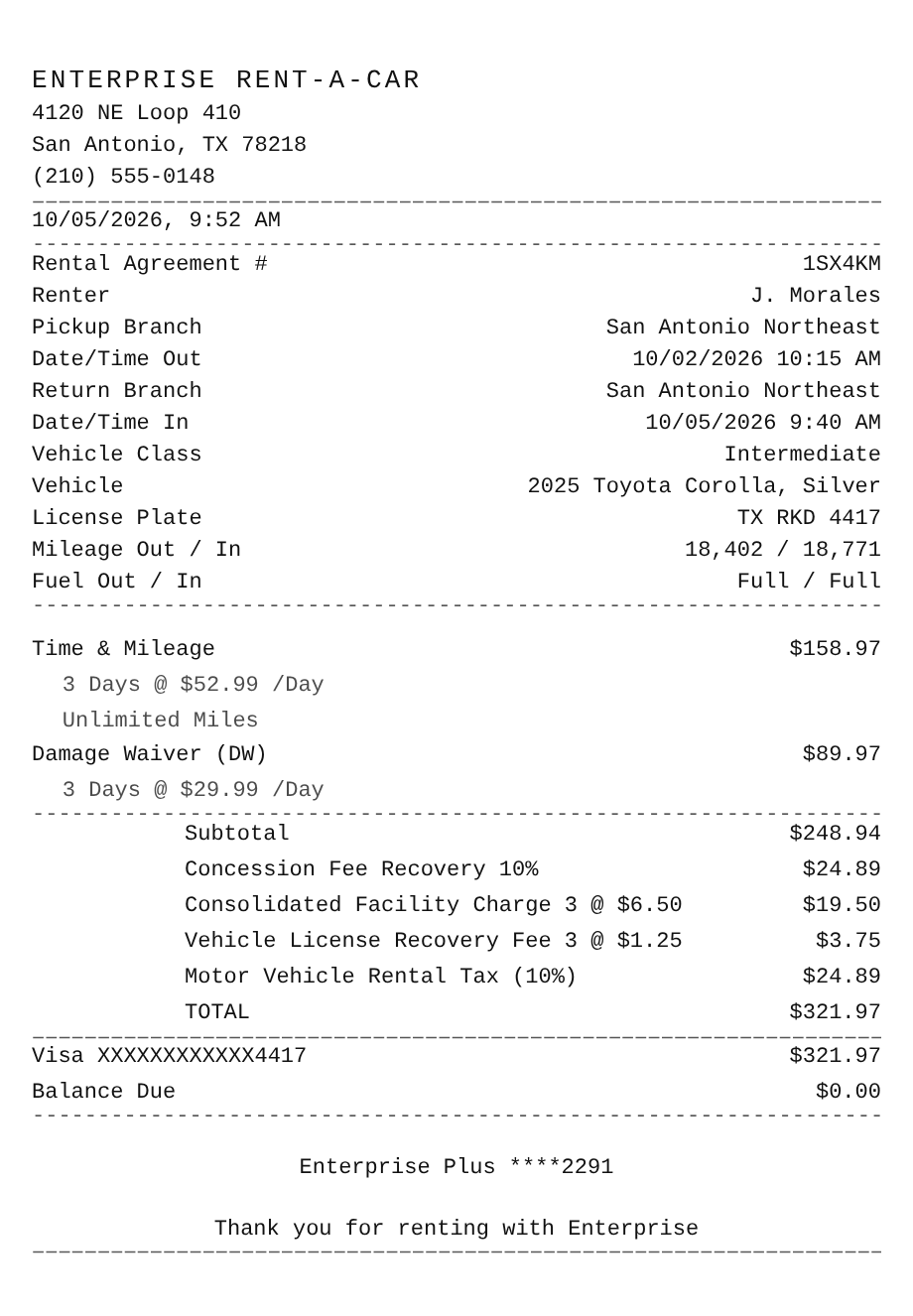
An Enterprise rental car receipt sums up the closed rental: the rental agreement number, the branch and the date and time the car went out and came back, the vehicle and its mileage, then Time & Mileage, any protection you bought, the location's fees, tax, and the card that paid. Use the example below as an Enterprise receipt maker and download a PDF or PNG, or jump to the lookup steps to get your real receipt from enterprise.com.
Updated
Make your Enterprise Rent-A-Car receipt
Open this template in the editor, change any field, and download it. Free, no signup, no watermark.
Prefer to describe it? Use the AI receipt generator and it writes the Enterprise Rent-A-Car details for you.
- Store type
- Car rental company
- Receipt format
- A4 page
- Editable fields
- 16 fields
Anatomy
What Is on an Enterprise Rent-A-Car Receipt
An Enterprise receipt is a summary of the rental agreement once the car is back. It leads with the rental agreement number, the pickup and return branch, and the exact date and time out and in, then the vehicle class, the car and its plate, and the odometer and fuel at each end. The charges follow: Time & Mileage as the daily rate times the number of days, optional protection such as a Damage Waiver, and the mandatory fees for that location. Airport rentals add a Concession Fee Recovery and a facility charge, and some branches near an airport add them too when you arrived by air within the past 12 hours, as Enterprise notes for San Antonio. The example is a three-day rental by a renter who flew into San Antonio that morning, with Texas rental tax on top. Swap in your own rental and it becomes a receipt you can print or save.
- Agreement and branches
- The rental agreement number, the renter, the pickup and return branch, and the date and time out and in.
- Vehicle and mileage
- The vehicle class, make and model, license plate, the odometer reading out and in, and the fuel level at each end.
- Time & Mileage
- The daily rate times the rental days on one line, with Unlimited Miles noted when there is no per-mile charge.
- Protection products
- Optional coverage you accepted at the counter, such as a Damage Waiver, priced per day.
- Fees, tax, and payment
- Airport recovery and facility charges, the Vehicle License Recovery Fee, the state rental tax, the card charged, and the balance due.
Decoder
Enterprise receipt codes decoded
| Field | What it means |
|---|---|
| Rental Agreement # | The contract number for this rental. Toll statements and missing Enterprise Plus points requests are looked up with it. |
| Time & Mileage | The base rental: the daily rate times the number of rental days. Unlimited Miles means no per-mile charge on top. |
| Damage Waiver (DW) | Optional protection, not insurance. Enterprise waives your responsibility for all or part of the cost of damage, loss, or theft of the car. |
| Concession Fee Recovery | Recovers the fee Enterprise pays an airport to rent cars there, as a percentage. Some nearby branches charge it if you arrived by air within the past 12 hours. |
| Consolidated Facility Charge | A per-day airport charge for the rental car facility, collected for the airport. $6.50 a day applies to San Antonio airport arrivals. |
| Vehicle License Recovery Fee | A per-day charge that recovers what Enterprise pays to license and register its fleet in that state. |
| Mileage Out / In | The odometer when the car left and when it came back. The difference is the miles you drove. |
At a glance
This Enterprise Rent-A-Car Receipt Example, Field by Field
| Paper size | A4 page |
|---|---|
| Text alignment | Left aligned |
| Currency | USD |
| Sales tax | Motor Vehicle Rental Tax 10% |
| Tip line | Optional line |
| Barcode or QR | None |
| Line items | 2 |
Compare
How Enterprise Rent-A-Car Receipts Compare to Other Stores
Enterprise, Hertz, and Avis are the three big rental car names in the US. Here is how their programs compare.
| Feature | Enterprise | Hertz | Avis |
|---|---|---|---|
| Loyalty program | Enterprise Plus | Hertz Gold Plus Rewards | Avis Preferred |
| Toll program | TollPass | PlatePass | e-Toll |
| Parent company | Enterprise Mobility | Hertz Global Holdings | Avis Budget Group |
| Sister brands | National, Alamo | Dollar, Thrifty | Budget |
See also: Uber receipt template · Motel 6 receipt template
How to
How to Make an Enterprise Rent-A-Car Receipt
- 1
Open the Enterprise Template
Start from this example so the agreement block, vehicle and mileage lines, charges, and fees are already laid out.
- 2
Enter the Rental Details
Type the rental agreement number, branches, dates and times, vehicle, plate, and the mileage out and in from your rental.
- 3
Set Charges and Fees
Enter your daily rate and days, any protection you accepted, and the fees for the location, then set the rental tax rate for your state.
- 4
Download the PNG or PDF
Export a PDF for a travel expense report, or keep a PNG with your trip and mileage records.
Lost receipt
Lost Your Enterprise Rent-A-Car Receipt?
Enterprise has its own receipt lookup on enterprise.com. A receipt appears there 48 hours after you return the car and stays searchable for six months, or for 360 days in your profile if the rental was on your Enterprise Plus account.
- 1Open Search for a Past Rental Receipt on enterprise.com, choose the country where you rented, and enter your driver's license number and last name exactly as they appear on the rental contract.
- 2If nothing comes up, check the country, the license number, and the spelling of your name against the contract, and make sure 48 hours have passed since the return.
- 3Enterprise Plus members can sign in and find receipts in their profile for 360 days, and a copy is emailed automatically when the Enterprise Plus number is on the rental.
- 4For a rental more than six months old, contact the branch you rented from for a copy. For a recent rental you still cannot find, call Enterprise at 1 (855) 266-9565.
- 5Tolls are billed separately through TollPass. Find that statement on the Highway Toll Administration site with your last name and rental agreement number, or your last name and the first six and last four digits of the card you paid with.
Keeping it for taxes? The IRS suggests holding on to receipts and other records for three years from the date you file, and longer for some. Read the IRS recordkeeping guidance.
Official Enterprise Rent-A-Car help
- Search for a past rental receipt(opens in a new tab)
Enterprise's receipt lookup by country, driver's license number, and last name.
- Copy of a rental car receipt(opens in a new tab)
How long receipts stay online and what to do for older rentals.
- Toll and citation receipts(opens in a new tab)
How to find the TollPass statement for tolls on your rental.
Links go to Enterprise Rent-A-Car's own website. Receipt Canvas is not affiliated with Enterprise Rent-A-Car.
Who uses it
Who Makes an Enterprise Rent-A-Car Receipt
Business Travel Reimbursement
Rebuild a readable record of a rental you made for work, with the airport fees itemized, when a reviewer needs more than the card statement.
Mileage and Vehicle Logs
Keep the odometer out and in for a rental used for business driving or a reimbursed trip.
Trip Budgets
See what a rental really cost once recovery fees, facility charges, and rental tax land on top of the daily rate.
Expense App and OCR Testing
Per-day fees, a percentage recovery fee, and a long agreement block make a demanding test case for a receipt parser.
A quick note on the rules: making a receipt shaped file for a mockup, a test, a class, or a lost expense you really paid is fine. Passing one off as proof of a purchase that never happened is fraud. Please do not do that.
FAQ
Enterprise Rent-A-Car Receipt Questions
How Do I Look Up an Enterprise Rental Car Receipt?
Use Search for a Past Rental Receipt on enterprise.com. Choose the country where you rented and enter your driver's license number and last name as they appear on the rental contract. Receipts show up 48 hours after the return and stay online for six months, or 360 days in an Enterprise Plus profile.
What Is the Concession Fee Recovery on an Enterprise Receipt?
It recovers the concession fee Enterprise pays an airport for the right to rent cars there, charged as a percentage. Some branches near an airport charge it too, along with the facility charge, when you arrived at that airport within the past 12 hours.
Why Are Tolls Not on My Enterprise Receipt?
Tolls go through Enterprise's TollPass service and are billed separately from the rental charges. You can view the toll statement on the Highway Toll Administration site with your last name and rental agreement number.
Is the Damage Waiver on My Receipt Insurance?
No. Enterprise describes the Damage Waiver as optional and not insurance. If you buy it, Enterprise agrees to waive your responsibility for all or part of the cost of damage to, or loss or theft of, the vehicle.
Is This an Official Enterprise Rent-A-Car Document?
No. This is an editable template that follows the layout of a rental car receipt. It is for mockups, tests, props, and rebuilding a record of a rental you actually made, and it is not affiliated with or endorsed by Enterprise Rent-A-Car.
Keep going
Similar Receipts
Uber receipt example
UberX airport run with the trip fare, Booking Fee, tolls and surcharges, New Jersey sales tax, and a tip.
See example and templateMotel 6 receipt example
Two-night guest folio with a room charge per night, state and city occupancy tax, My6, and a zero balance.
See example and templateBP receipt example
Pay-inside fill-up with a pump number, gallons at the posted price, the earnify discount, and coffee from the store.
See example and template